The message usually arrives late in the afternoon: "Can you take a look? I think Git is broken." It comes from a teammate who's new to GitHub, and attached is a pull request that should contain three commits and contains nine. Two of them are called "fix typo". One is called "stuff". Somewhere in the middle are merge commits nobody remembers making.
Git isn't broken, of course. Git did precisely what it was told, several times, in an order that made sense to someone at the time. In my opinion, the worst thing you can do now is start fixing. You first need to know what actually happened, because every repair in Git -- a reset, a rebase, a force push -- assumes you know which commits matter and which ones are copies. Fix the wrong thing, and you have two messes instead of one.
For this post, I rebuilt such a mess from scratch. Then we read it like a crime scene in GitKraken Desktop's commit graph: four classic mistakes, what each one looks like, how it happened, and how to get the branches and pull requests back on track. At the end, there's one trap that undid my own cleanup in testing, and it's the reason I wouldn't fix a teammate's branch without talking to them first.
The crime scene: a repository you can rebuild
To read a history, we need a realistic one, and the clean demo repositories in most tutorials don't qualify. So I wrote a small shell script that plays three developers on a fictional restaurant website (Los Pollos Hermanos, naturally). Each person works in their own clone and pushes to a shared remote, and every mistake is made for real with plain git commands -- nothing is edited or faked after the fact.
The cast is short. Holger is the team lead and merges the pull requests. Maya is an experienced teammate. Jesse is new to Git and GitHub, motivated, and fast. Over four days around the end of September, Maya ships two pull requests and Jesse works on a menu with prices and a catering form. The repository starts with a contribution guide that says, in three short lines, to branch from main, open a pull request, and never commit to main directly. You can probably guess how that goes.
The script leaves three clones next to a bare repository that plays the role of GitHub. I opened Holger's clone -- the team lead's view, with every teammate branch fetched -- in GitKraken Desktop. Let's start the investigation.
What the terminal shows
Let's first look at the evidence the way Git prints it, because it's all there. This is the output of the classic alias many of us have in our shell configuration, with branch names decorated:
$ git log --graph --oneline --all --decorate --date-order
*   33780e7 (origin/feature/menu-prices) Merge branch 'feature/menu-prices' of github.com:pollos-hermanos/pollos-web into feature/menu-prices
|\
* | 5b0e0f1 feat(menu): add family meal prices
* | 6d43567 fix typo
* | 2d16d8e feat(menu): show prices on the menu page
| | * b2498b3 (origin/feature/catering) stuff
| * |   478a876 Merge branch 'main' into feature/menu-prices
| |\ \
| |/ /
|/| |
* | |   c9c5402 (HEAD -> main, origin/main, origin/HEAD) Merge pull request #15 from pollos-hermanos/fix/order-hours
|\ \ \
| * | | 34ec852 (origin/fix/order-hours) fix(order): stop taking orders after 10 pm
|/ / /
| * | 0ab974b feat(menu): add family meal prices
| * |   4159866 Merge branch 'main' into feature/menu-prices
| |\ \
| |/ /
|/| |
* | |   df1a71a Merge branch 'main' of github.com:pollos-hermanos/pollos-web
|\ \ \
* | | | dd72315 fix: footer phone number
| * | | c78ffdd Merge pull request #12 from pollos-hermanos/feature/order-online
|/| | |
| * | | 709ad73 (origin/feature/order-online) feat(header): link the order page
| | | * 1e0ea1a feat(catering): add the catering inquiry form
| | |/
| | * 5235256 fix typo
| | * 67c4443 feat(menu): show prices on the menu page
| |/
|/|
| * 351d218 feat(order): add the order page
|/
* f4ea835 docs: add contribution guide
* 8586694 chore: scaffold pollos-web
Honestly, cross my heart, every one of the four mistakes is in that output. All the information is there. What's missing is the reading. Lanes shift sideways whenever a merge comes in, the same commit message shows up twice with different hashes, and you have to keep track of which | belongs to which branch across thirty lines. I can read it. I can't read it quickly, and I can't hand it to a junior developer and say "look, that's what happened".
The same history in GitKraken
Now let's open the same repository in GitKraken Desktop. Each branch gets its own lane and color, merges are drawn as curves into the lane they land in, and every commit carries the author's avatar, so "who did what" is visible before you read a single message.
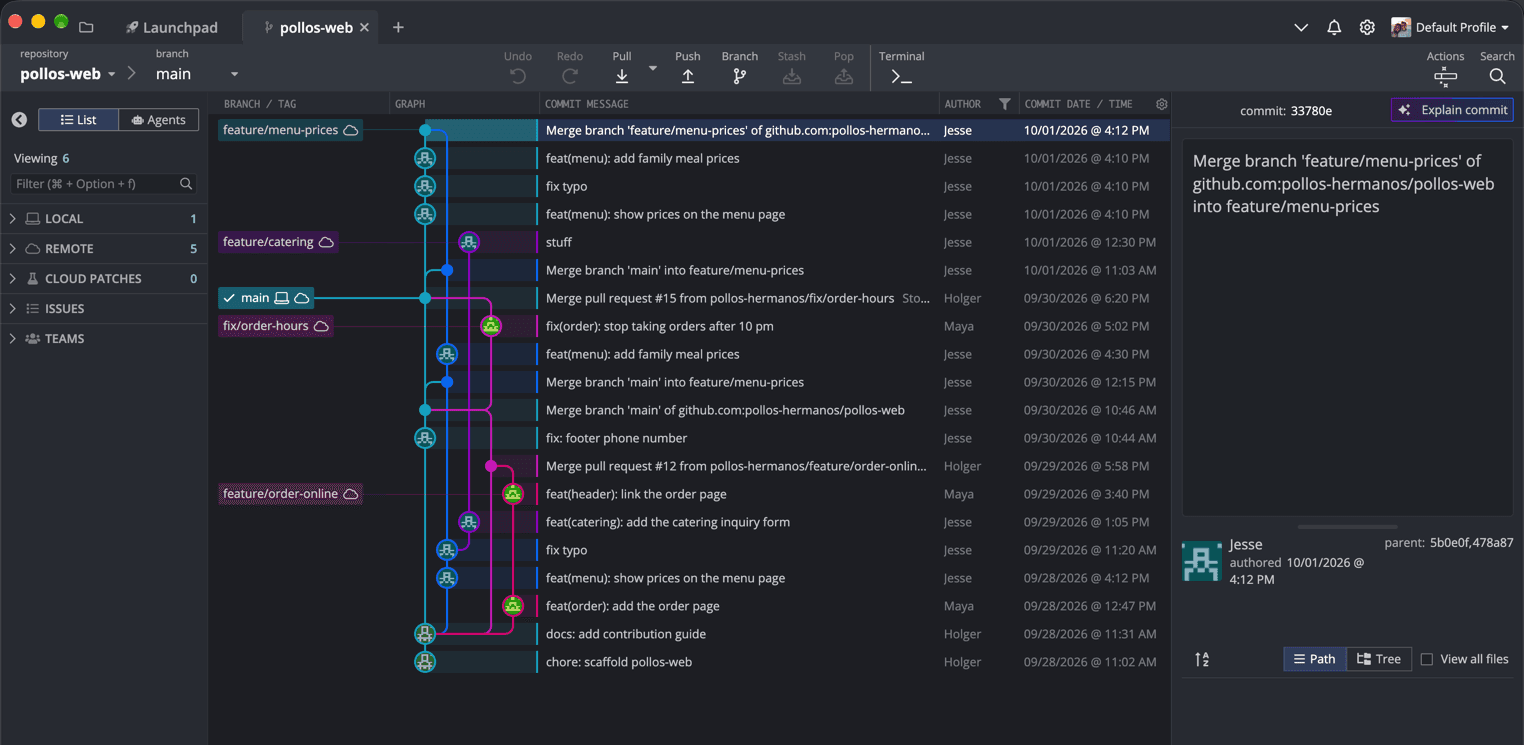
main, two of Maya's merged branches, and Jesse's two feature branches.Two features do most of the forensic work here. First, the graph's columns are configurable: by default you get branch/tag labels, the graph, and the commit message, and a right-click on the column header adds author, date/time, and SHA (GitKraken's interface documentation has the details). Second, the Author column has a filter icon. Filter it to Jesse, and the question "what did he actually do this week?" is answered without a single command. Searching with Cmd/Ctrl+F works too; it covers commit messages, SHAs, and authors, and highlights the matches in the graph rather than hiding the rest.
One more detail is worth learning right away, because it matters at the end of this post: the icons on the branch labels. The main label carries a laptop and a cloud, which means the local branch and its counterpart on the remote point to the same commit. Jesse's and Maya's branches only carry the cloud; they exist on the remote, and nobody has checked them out in this clone.
With the overview in place, we can take the four clues one at a time.
Clue 1: A merge on main that no pull request made
The first thing that stands out on main is a merge commit whose message doesn't follow the pattern of the others. Every pull request leaves a Merge pull request #NN from ... commit. This one says Merge branch 'main' of github.com:pollos-hermanos/pollos-web, and that message is the fingerprint of git pull: it's what Git writes when it merges the remote version of a branch into your local version of the same branch.
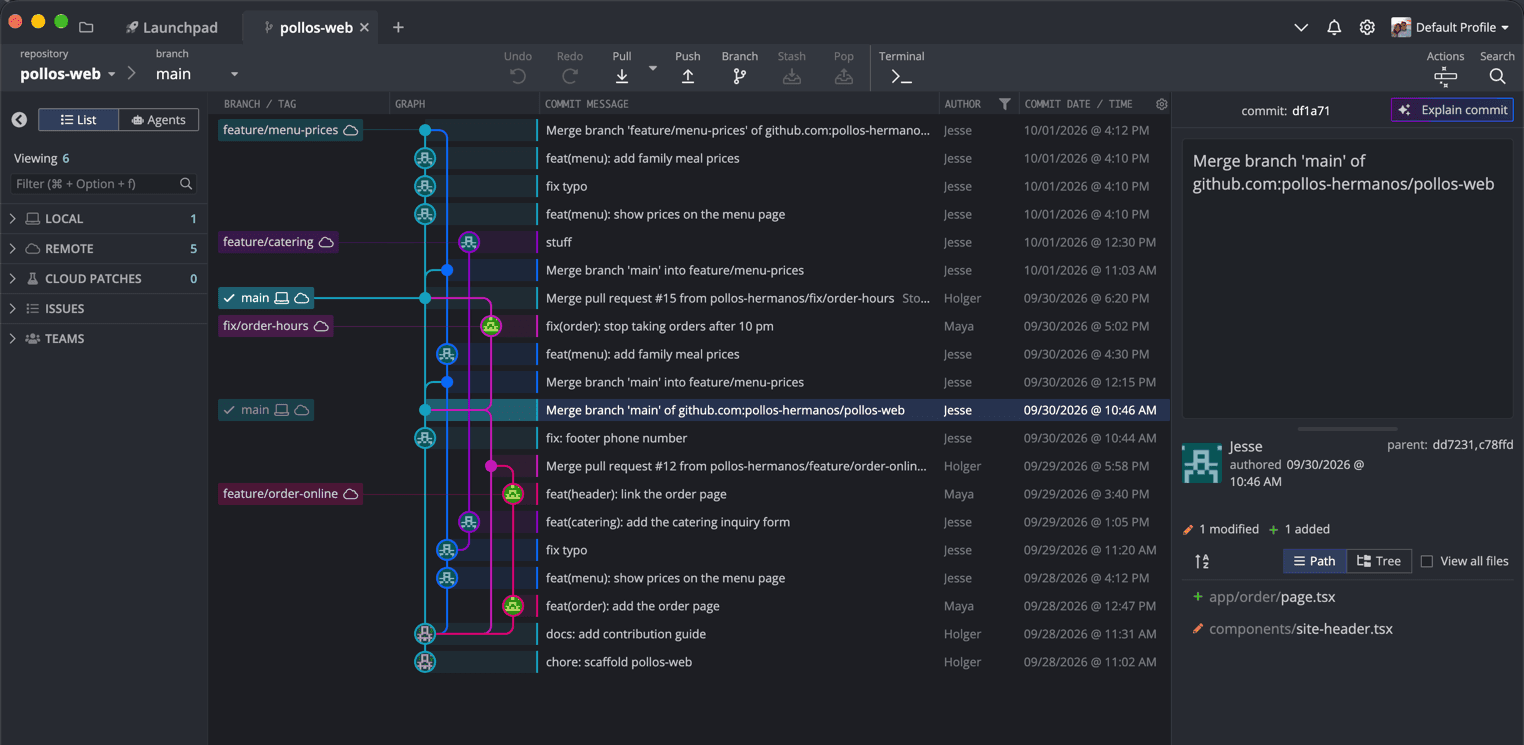
main, glued to PR #12 by a merge that only git pull writes.Reading the graph backward tells the whole story. Jesse fixed the phone number in the footer and committed it on his local main -- a one-line change, so why bother with a branch. Meanwhile, PR #12 had landed on main on the server. His push was rejected, because his main and the server's main had diverged. So he did what the error message suggests and pulled, which merged the server's main into his own, and then the push went through.
Select the merge, and the commit panel confirms every step of that story. The parents are dd7231 and c78ffd: Jesse's footer fix first, PR #12 second. The changes it lists, a new app/order/page.tsx and a modified components/site-header.tsx, are exactly Maya's order page -- the work Jesse's laptop didn't have yet. The faded main label next to the selected row is GitKraken's ghost branch label, which shows the branch that contains the commit you're looking at.
You might wonder how he ended up with a merge in the first place, since modern Git refuses to pull diverged branches until you tell it how. That's true -- I tried it with Git 2.54, and the pull stops with a hint. The hint, however, lists three options, and the first one is this:
hint:   git config pull.rebase false  # merge
hint:   git config pull.rebase true   # rebase
hint:   git config pull.ff only       # fast-forward only
Guess which line someone new to Git copies. In the demo, Jesse's clone is configured with exactly that first line.
Is the merge a disaster? No. Nothing was lost, and the footer fix is perfectly fine. The side effect is subtle, though. A merge records the branch you were on as its first parent, so main's first-parent line now runs through Jesse's laptop instead of through PR #12:
$ git log --first-parent --oneline main
c9c5402 Merge pull request #15 from pollos-hermanos/fix/order-hours
df1a71a Merge branch 'main' of github.com:pollos-hermanos/pollos-web
dd72315 fix: footer phone number
f4ea835 docs: add contribution guide
8586694 chore: scaffold pollos-web
PR #12 is gone from that list. The work is there; it just moved to the second parent. If your team reads --first-parent as "what landed on main, one pull request per line", this is where the story gets confusing.
The fix: leave it, and protect main
The repair for clue 1 is, in my opinion, to do nothing to the history. main is shared; rewriting it means every clone in the team has to recover, which is a far bigger mess than one odd merge commit. The real fix is upstream. On GitHub, a branch protection rule or ruleset that requires a pull request for main makes the push fail for good, with a message that tells Jesse why. And a short chat about git config --global pull.ff only makes Git stop and ask, instead of merging silently, the next time a branch has diverged.
Clue 2: A branch that grows out of the wrong branch
The second clue is the reason PR #14, the catering form, contains commits about menu prices. In the graph, the feature/catering lane doesn't start at main. It starts at the "fix typo" commit of feature/menu-prices.
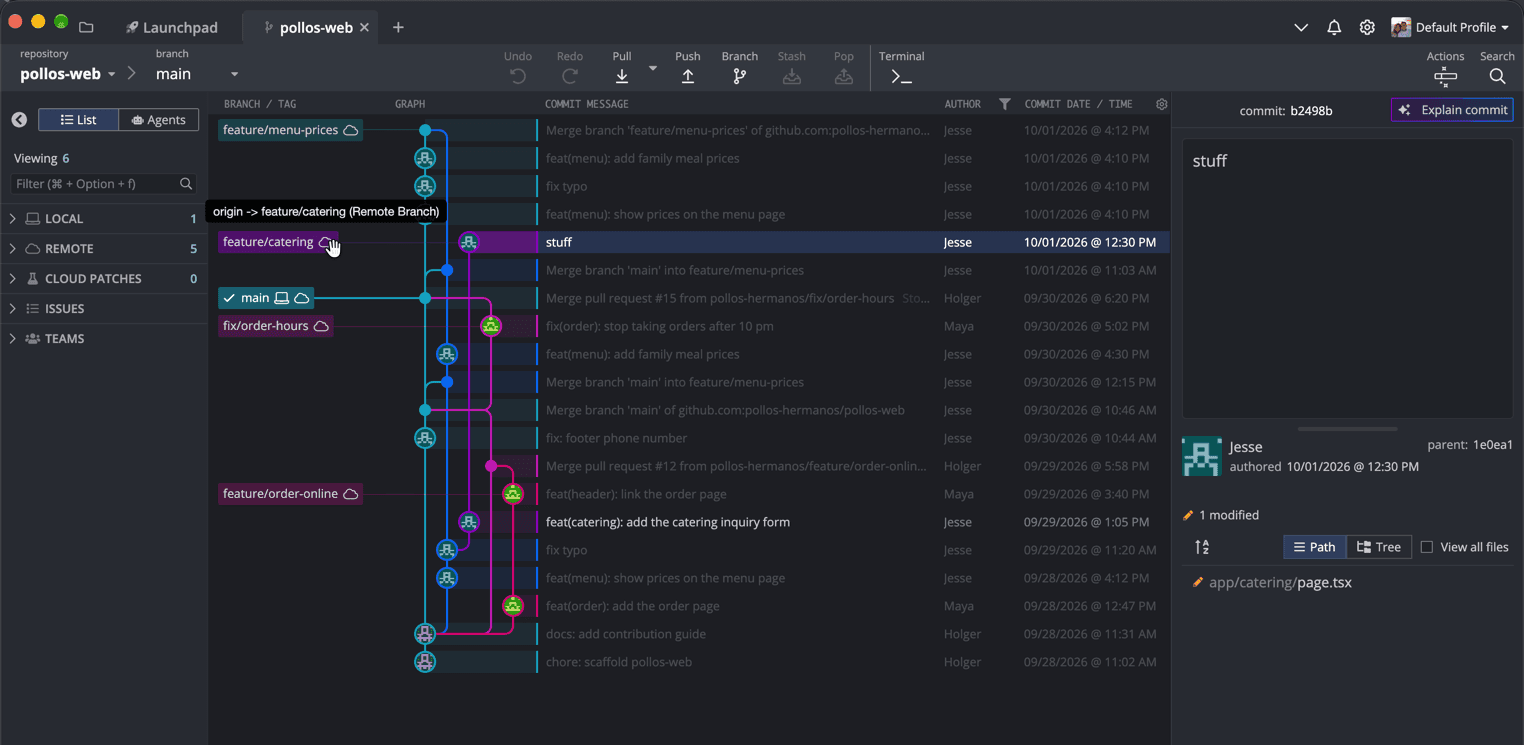
feature/catering highlights its own two commits -- and its purple lane joins Jesse's blue menu lane at "fix typo", not main.You don't have to trace the lanes by eye to see this. Hover over the feature/catering label, and GitKraken highlights the branch's commits and fades the rest. Two commits light up, "add the catering inquiry form" and "stuff". The telling part is where that purple lane goes next: it doesn't curve back into main, it curves into Jesse's blue menu lane at "fix typo". Everything below that junction is shared with the menu branch -- and a pull request against main carries all of it, as we'll see in a second. If the other branches get in the way, right-click main and feature/catering and choose Solo; solo mode hides every branch you haven't explicitly soloed.
In my experience, this is one of the most common mistakes of developers new to Git, and it's completely understandable. git checkout -b (or the "New branch" button in any GUI) branches from wherever you are right now, not from main. Jesse was still on his menu branch when he started the catering form. The pull request against main then dutifully lists everything that is on the catering branch but not on main:
$ git log --oneline main..origin/feature/catering
b2498b3 stuff
1e0ea1a feat(catering): add the catering inquiry form
5235256 fix typo
67c4443 feat(menu): show prices on the menu page
Note the difference to the highlight in GitKraken: the graph shows you the two commits that belong to the catering lane, while the pull request is computed from everything that isn't on main yet. Two of those four commits belong to another pull request. Merge PR #14 first, and half of the menu feature lands on main without review.
The diagram below shows the difference between where the branch starts and where it should start.
The solid colored line is what Jesse built; the dashed one is where the catering branch belongs. Everything between the two starting points ends up in the wrong pull request.
The fix: move the branch, or make the dependency honest
There are two good answers, and which one is right depends on a question only Jesse can answer: does the catering form need the menu prices? If it doesn't, we move the two catering commits onto main and leave the menu commits behind. In GitKraken, an interactive rebase of feature/catering onto main lists all four commits, and we simply drop the two menu commits. While we're there, we fold "stuff" into the commit before it, because "stuff" is not a commit message, it's a cry for help. The sad part is that Jesse didn't even have to come up with a better one. GitKraken Desktop can suggest a commit message from your staged changes with its AI, and I've written a whole love letter to the worst commit messages in history about exactly that. "Fixed stuff" made it into the title for a reason.
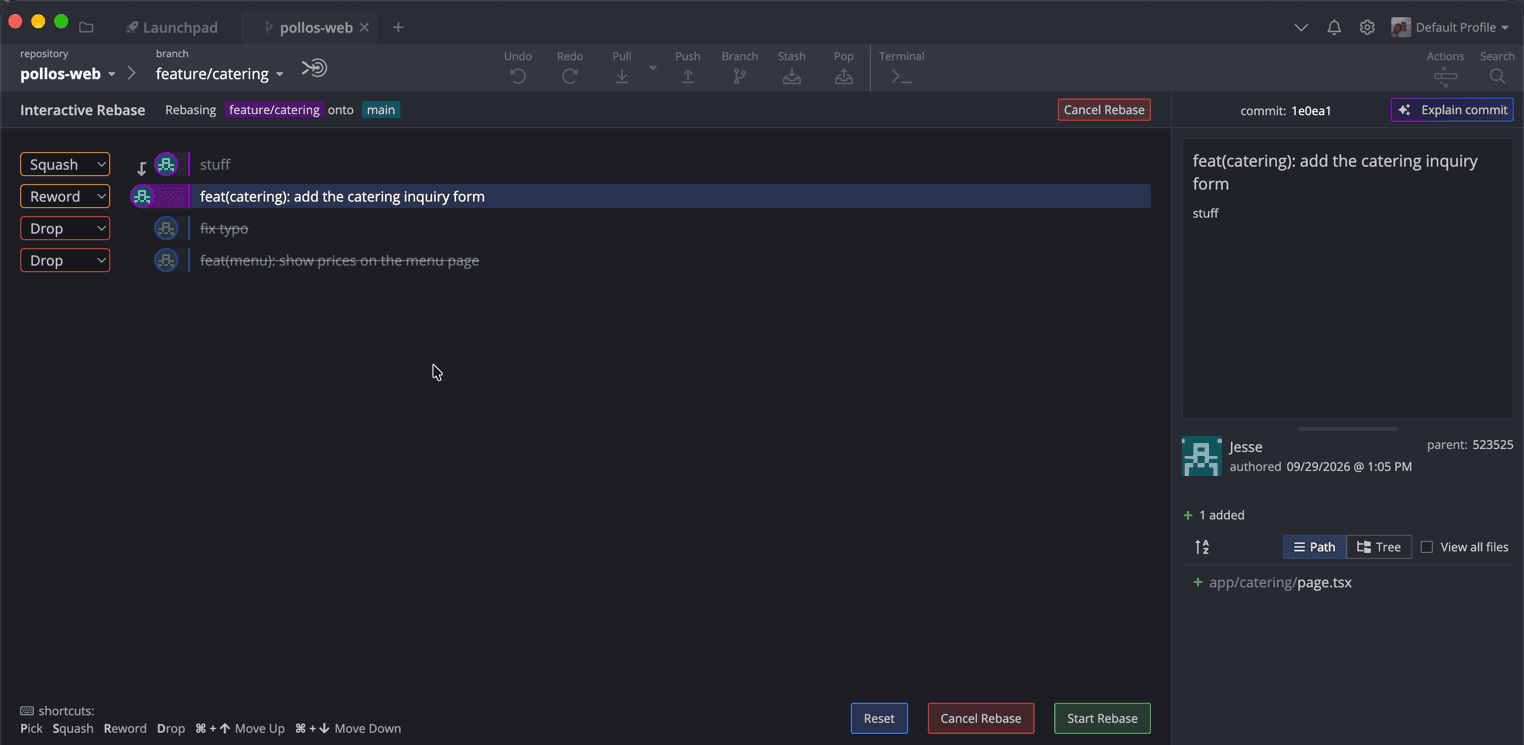
feature/catering onto main: two menu commits dropped, "stuff" squashed into the form, which GitKraken switched to Reword on its own.To get there, double-click origin/feature/catering to create a local branch, then drag the feature/catering label onto main in the graph. GitKraken opens a small menu of everything you can do with the two branches.
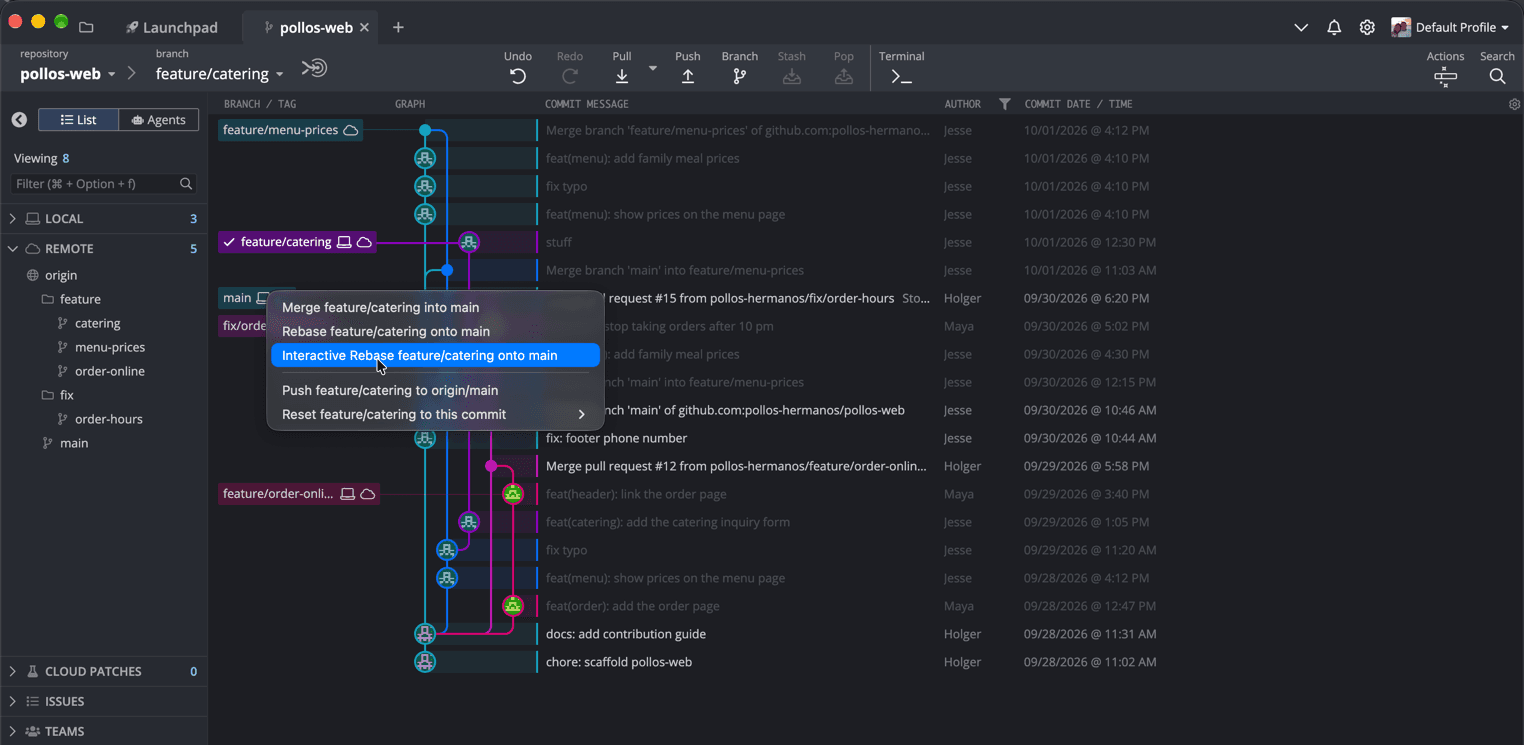
feature/catering onto main: merge, rebase, interactive rebase, push, or reset.We pick Interactive Rebase feature/catering onto main. Note the entry below it, though: Push feature/catering to origin/main is one slip of the mouse away and would put the catering branch straight onto main on the server -- one more reason for the branch protection from clue 1. GitKraken then lists the commits with the actions Pick, Reword, Squash, and Drop, and nothing happens until you click Start Rebase. Dropped commits are struck through. When you set "stuff" to Squash, a small arrow shows it folding into the commit below, and GitKraken switches that commit from Pick to Reword by itself, because two commits are about to become one and need one message. The proposed message is the form's message with "stuff" appended as a second line, and you edit it right there in the panel on the right, before you start the rebase. Delete that line; nobody will miss it. Note that GitKraken's interactive rebase doesn't accept merge commits on the branch you rebase, so this works for the catering branch but not for the menu branch with its merges -- which is fine, because the menu branch needs a different repair anyway. Then we push, and this is where it gets interesting.
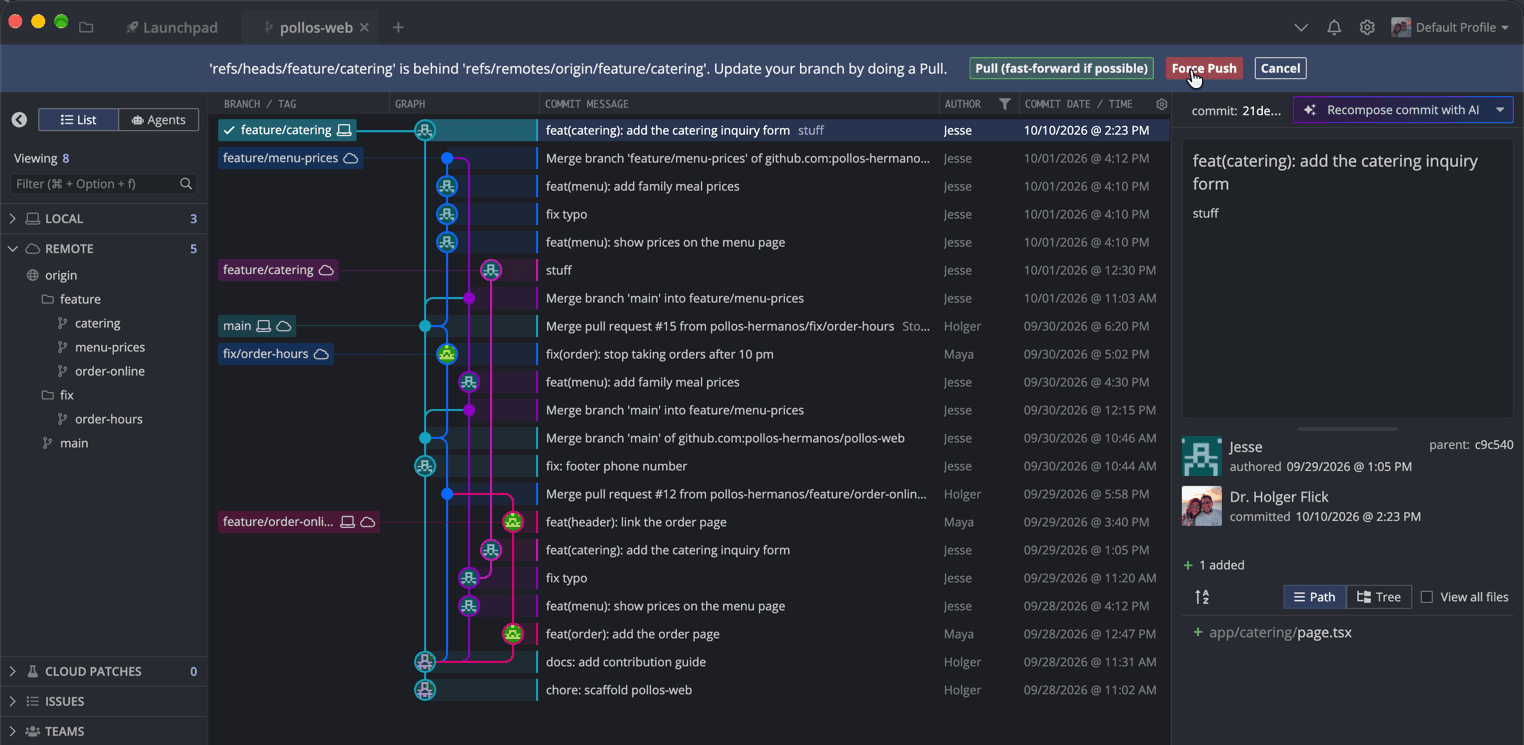
GitKraken refuses the normal push, says the local branch is behind the remote one, and suggests a pull. Strictly speaking, the two have diverged: the rebased commit exists only locally, the four old ones only on the server. Read that banner twice, because it gives exactly the advice that Jesse followed in clue 4. After a rebase you did on purpose, Pull merges the old commits right back in, and Force Push is the button you want -- more about forcing safely in clue 4. Note the commit panel, too: Jesse is still the author, dated September 29, but the committer is me, today. That's what "a rebase writes new commits" looks like in practice.
On the command line, the same move is a git rebase --onto, which takes the commits after 5235256 and replays them on top of main:
$ git switch feature/catering
$ git rebase --onto origin/main 5235256
Successfully rebased and updated refs/heads/feature/catering.
$ git log --oneline origin/main..HEAD
5407852 stuff
009b1d8 feat(catering): add the catering inquiry form
Both hashes are brand-new. A rebase writes new commits and stamps them with the current time -- which, as it turns out, is the whole point of clue 4. A follow-up git rebase -i origin/main then turns "stuff" into a fixup of the form commit.
If the catering form does depend on the menu, the honest fix is not to move anything but to say so: change the base of PR #14 from main to feature/menu-prices, as GitHub lets you do on any open pull request. Now the pull request shows only the catering commits, and it's obvious that it has to wait for the menu.
Clue 3: The ladder
The third clue looks dramatic in the graph and is the least harmful of the four. feature/menu-prices has two commits called Merge branch 'main' into feature/menu-prices, and each one draws a rung from main across to Jesse's lane.
In the demo, these two merges stand in for the Update branch button that GitHub shows on a pull request that has fallen behind its base. Clicking it performs "a traditional merge" of the base branch into the pull request's branch; the dropdown next to it also offers Update with rebase. Jesse pressed it twice, which is exactly what the button is for. Nothing here is a mistake.
I'll admit that I prefer a feature branch without rungs; a rebase onto main or a squash merge at the end keeps the history of main easy to read. Plenty of experienced teams see that differently, and they have a point: a merge records what actually happened and never rewrites a commit someone else may already have, while a rebase does. As we'll see in a moment, that difference is precisely what turned this ladder into clue 4. Thus, if your team is new to Git, I'd rather see a few rungs than a rewritten branch nobody understands. Squash merging the pull request at the end (one of GitHub's three merge methods) cleans them up without asking anyone to rebase.
Clue 4: Every commit, twice
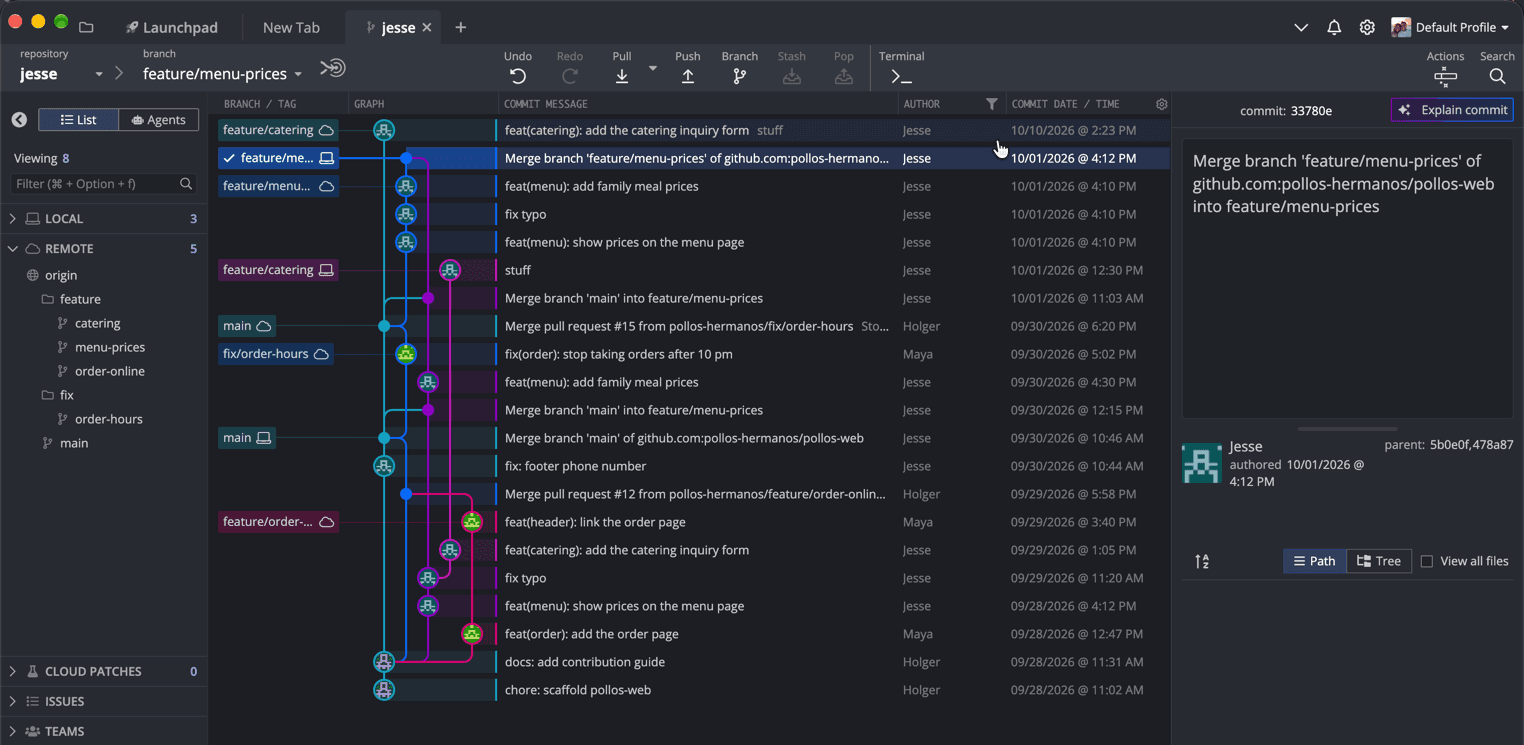
The fourth clue is the one that triggered "I think Git is broken." At the top of the graph, feature/menu-prices splits into two parallel lanes that carry the very same three commit messages -- "show prices", "fix typo", "family meal prices" -- with different hashes, joined by a merge at the top.
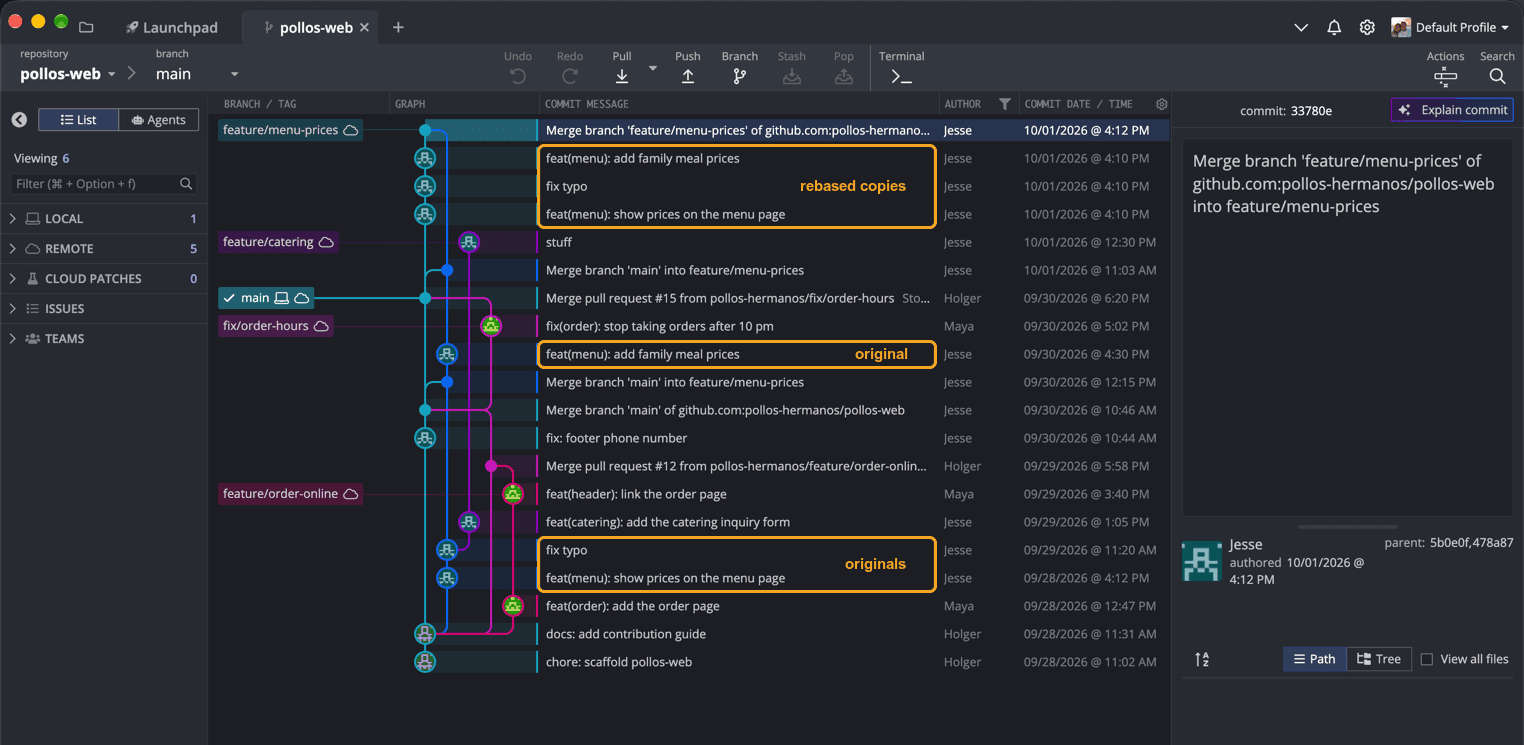
5b0e0f as its first parent and changes no files.Here's what happened. After the second Update branch, someone told Jesse that he should rebase instead of merging. Good advice, in principle. He ran git rebase origin/main, which doesn't move commits -- it creates new copies of them on top of main, with new hashes, and drops the merge commits. His local branch now had the copies; the server still had the originals. The push was rejected because the two had diverged, and Jesse did what had worked on main the day before: he pulled. The pull merged the originals right back in.
The important detail is in the third panel. The rebased copies are the merge's first parent, because that's the branch Jesse was on when he pulled. GitKraken shows this without any command: select 33780e7, and the commit panel lists its parents as 5b0e0f, 478a87 -- the rebased copy first, the old ladder second. Everything we need for the repair is therefore already in the graph: the copies sit on a clean lane on top of today's main, and the merge at the top contributes nothing new.
You don't have to take the graph's word for it, either. Git can prove that the two lanes are the same work. --cherry-mark compares the two sides of the merge by content and marks equivalent commits with =, and the merge itself turns out to change nothing compared to its first parent:
$ git log --oneline --cherry-mark --left-right --no-merges 33780e7^1...33780e7^2
= 5b0e0f1 feat(menu): add family meal prices
= 6d43567 fix typo
= 2d16d8e feat(menu): show prices on the menu page
> 34ec852 fix(order): stop taking orders after 10 pm
= 0ab974b feat(menu): add family meal prices
= 5235256 fix typo
= 67c4443 feat(menu): show prices on the menu page
$ git diff --stat 33780e7^1 33780e7
$
Three pairs of =, and an empty diff. The only commit without a twin is Maya's 10 pm fix, which the originals simply don't contain because they're older than it.
The fix: reset to the copies, then force-push carefully
Since the clean version is right there, the repair is a reset. We check out feature/menu-prices (a double-click on the remote branch creates the local one), reset it to 5b0e0f1 -- the rebased "family meal prices" commit, the first parent of the merge -- and push with force. In GitKraken, that's a right-click on 5b0e0f1, Reset feature/menu-prices to this commit, and Hard. The following push is rejected again, and GitKraken shows the same banner as for the catering branch. This time we know better than to pull and choose Force Push.
On the command line, I always use --force-with-lease instead of a plain --force. It only overwrites the branch on the server if it still points where you last saw it, so you don't silently destroy a commit someone pushed a minute ago. According to its 9.6.1 release notes, GitKraken's force push defaults to --force-with-lease as well when it uses the Git executable, which is enabled by default:
$ git switch feature/menu-prices
$ git reset --hard 33780e7^1
$ git push --force-with-lease
 + 33780e7...5b0e0f1 feature/menu-prices -> feature/menu-prices (forced update)
Together with the rebased feature/catering, the graph now looks the way it should have looked all along: two short branches on top of main, three commits for the menu, one for catering.
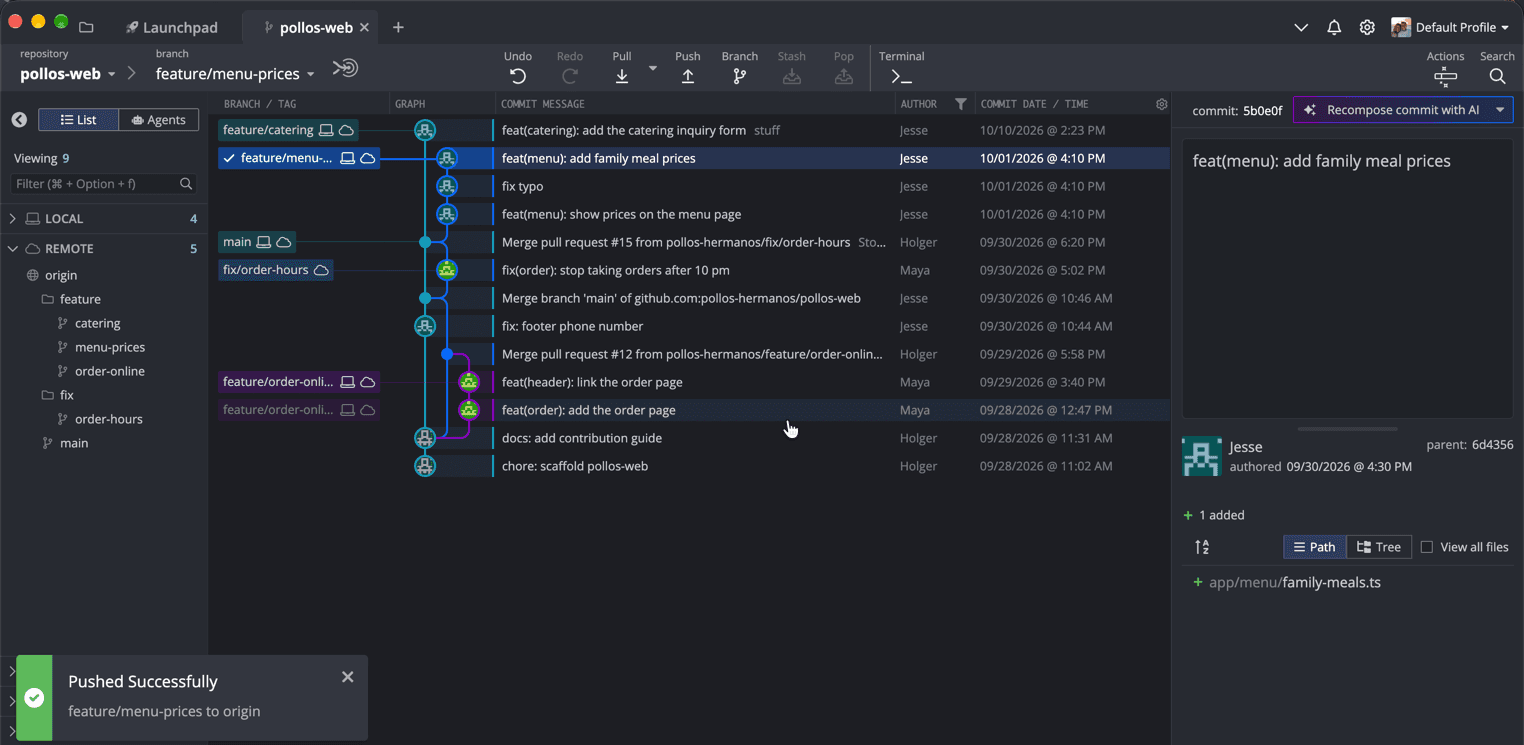
main, with no duplicates and no ladder. The git pull merge from clue 1 stays on main on purpose.The trap: Jesse's laptop still remembers
This is where I thought we were done, and this is where my test run taught me otherwise. Everything I fixed, I fixed on the server. Jesse's laptop still has his old feature/menu-prices, the one with the duplicates, and it has no idea that anything happened.
So I played Jesse and did what he would do the next morning: pull, then push.
$ git status -sb
## feature/menu-prices...origin/feature/menu-prices
$ git pull
Already up to date.
$ git status -sb
## feature/menu-prices...origin/feature/menu-prices [ahead 6]
$ git push
   5b0e0f1..33780e7  feature/menu-prices -> feature/menu-prices
"Already up to date" is technically correct and completely misleading. From Git's point of view, Jesse's branch contains the cleaned-up branch plus six more commits -- the originals, the two ladder merges, and the duplicate merge -- so it's simply ahead. And a branch that is ahead can be pushed without any force at all. One plain git push, and every duplicate is back on the server. No error, no warning.
In GitKraken, this situation is easy to spot if you know where to look. Remember the laptop and the cloud on the main label from the overview? Open Jesse's clone and fetch, and on his branches the two have parted ways. The laptop label for feature/menu-prices still sits on the duplicate merge 33780e7; the cloud label sits one row below, on the clean 5b0e0f. The left panel can also show how far each branch is ahead of or behind its remote after a fetch.
It isn't just the menu branch, either. Jesse's local feature/catering still points to the old "stuff" commit -- 4 commits ahead and 8 behind its cleaned-up remote -- and his local main still sits on his own git pull merge from clue 1, two commits behind. Three stale branches, one laptop.
feature/menu-prices is six commits ahead of the cleaned-up remote.The fix on Jesse's side is to make his local branch match the server, after making sure there is no new work on it that only exists on his laptop:
$ git fetch
$ git reset --hard origin/feature/menu-prices
$ git status -sb
## feature/menu-prices...origin/feature/menu-prices
In GitKraken, that's a right-click on the commit that origin/feature/menu-prices points to, then Reset feature/menu-prices to this commit and Hard. If there is new work on the stale branch, cherry-pick it onto the clean branch first. And if anything goes wrong anyway, git reflog remembers where every branch pointed before the reset.
Thus, my rule after cleaning up anybody's branch: talk to them before the force push, and walk them through the reset afterward. Cleaning up silently isn't helping; it's setting a trap for the next morning.
What I change in the team, not just in the repository
Repairing four mistakes takes a few minutes once you can read them. Preventing them is mostly about two settings and one habit.
The two settings are the ones from clue 1: protect main on GitHub so that nobody can push to it directly, and set pull.ff only so that Git stops and asks whenever a branch has diverged instead of quietly merging. Both turn silent mistakes into loud ones, and loud mistakes come with a message that a beginner can search for.
The habit is to look at the graph before pushing, and especially before any force push. With developers who are new to GitHub, this is the routine I recommend: before they push, open the graph together and answer three questions. Where does my branch start? Is my local branch label on the same commit as the remote one, and if not, why? Does this pull request contain only my commits? It takes thirty seconds, and in my opinion it teaches more Git than any cheat sheet, because the developer sees their own work as a picture instead of memorizing commands.
The Bottom Line
Four mistakes, and none of them was Git being broken. A commit pushed straight to main and glued in by git pull. A branch started from the wrong branch. A ladder of perfectly legitimate update merges. And a rebase of a pushed branch, followed by a pull, that left every commit in two copies. Each one has a signature that you can read off the graph in seconds once you know it, and each one has a repair that's safe once you know which commits are the copies.
Read the graph first, fix second -- and the person whose branch it is should be in the room for both.
If you work with developers who are new to Git, this is the one thing I'd ask you to try: open their branch in a graph together before you fix anything. If you'd like to use GitKraken for that, my referral link gets you 50% off GitKraken Pro: try GitKraken Pro. Full disclosure: it's a referral link, and I'm a GitKraken Ambassador. The Community edition is free for local repositories and public remotes, and there's a free trial for the paid plans.
If you want to go further, my earlier post on GitKraken's graph view is a tour of its everyday features, and GitKraken Is Now the Code Flow Company explains where the company is heading. And when two branches don't just tangle but collide, my walkthrough of one real merge conflict in GitKraken picks up where this post ends.