In the previous post, we built a small REST server with WebBroker and nothing else from outside the Delphi box. It answers JSON, which is exactly what a JavaScript front end or a mobile app wants. However, quite a few web applications do not need a separate front end at all. A dashboard for the support team, an admin page for a service, a status page -- in many cases, HTML rendered on the server is the simplest thing that could possibly work.
For this job, Delphi has a tool built in: WebStencils, a template engine that Embarcadero introduced with RAD Studio 12.2. You write regular HTML files, mark the places where data goes with an @, and let Delphi fill them in.
In this post, we will add our first WebStencils page to the existing server: a layout, a page that uses it, a loop over a list of objects, and a condition. By the end, the same executable will answer JSON on one URL and HTML on another.
What WebStencils is, and what it is not
Before we write templates, it helps to know where WebStencils sits. WebBroker has had a way to produce HTML for a very long time: the TPageProducer component, which replaces tags like <#name> in an HTML file by calling an event handler for each one. It works, and there are plenty of applications in production that use it. WebStencils is the modern successor. According to Marco Cantù's introduction, its processor implements the same interface as the page producer and can replace it, but the templates are far more expressive: they can read properties of Delphi objects directly, loop over lists, and share a common layout.
If you would like to see the two side by side, David Cornelius has published a pair of WebBroker demos that implement the same site with page producers and with WebStencils. I found it a very good way to understand what changed.
The flow of a WebStencils page is simple. The processor reads a template, looks up the data we registered under a name, and produces HTML.
Note what the diagram does not contain: there is no JavaScript framework and no build step. The browser receives finished HTML. Also, WebStencils is not tied to WebBroker. The same processor works with RAD Server, and Marco points out that it can generate any text format, not just HTML.
WebStencils comes with two components. TWebStencilsProcessor renders one file. TWebStencilsEngine holds shared settings and can map URLs to template files. For our first page, the processor is all we need.
Step 1: The data for the page
WebStencils reads data from ordinary Delphi objects. We register an object under a name, and the template accesses its properties with @name.Property. Create a new unit HelloPageModel.pas with two small classes:
unit HelloPageModel;

interface

type
  TPageInfo = class
  private
    FTitle: string;
    FRenderedAt: string;
  public
    constructor Create(const ATitle: string);
    property Title: string read FTitle;
    property RenderedAt: string read FRenderedAt;
  end;

  TEndpoint = class
  private
    FPath: string;
    FDescription: string;
    FIsHtml: Boolean;
  public
    constructor Create(const APath, ADescription: string; AIsHtml: Boolean);
    property Path: string read FPath;
    property Description: string read FDescription;
    property IsHtml: Boolean read FIsHtml;
  end;

implementation

uses
  System.SysUtils;

{ TPageInfo }

constructor TPageInfo.Create(const ATitle: string);
begin
  inherited Create;
  FTitle := ATitle;
  FRenderedAt := FormatDateTime('yyyy-mm-dd hh:nn:ss', Now);
end;

{ TEndpoint }

constructor TEndpoint.Create(const APath, ADescription: string;
  AIsHtml: Boolean);
begin
  inherited Create;
  FPath := APath;
  FDescription := ADescription;
  FIsHtml := AIsHtml;
end;

end.
TPageInfo carries the page title and the time the page was rendered. TEndpoint describes one URL of our server, and IsHtml tells us whether it returns HTML or JSON. There is really no magic here: plain classes with read-only properties. We do not need published properties or attributes; the official WebStencils demos use exactly this kind of class with public properties.
Step 2: The templates
Next, we write two HTML files in a folder named templates. The first one is the layout, the frame that every page of our site shares:
<!doctype html>
<html lang="en">
<head>
  <meta charset="utf-8" />
  <title>@info.Title</title>
  <style>
    body { margin: 0; padding: 3rem 1.5rem; background: #f5f5f7; color: #1d1d1f;
      font: 17px/1.5 -apple-system, BlinkMacSystemFont, "Segoe UI", Helvetica, Arial, sans-serif; }
    main { max-width: 40rem; margin: 0 auto; padding: 2.5rem 3rem; background: #fff;
      border-radius: 18px; box-shadow: 0 4px 24px rgba(0, 0, 0, 0.06); }
    h1 { margin: 0 0 0.75rem; font-size: 2.25rem; font-weight: 700; letter-spacing: -0.02em; }
    p { color: #6e6e73; }
    a { color: #0066cc; text-decoration: none; }
    a:hover { text-decoration: underline; }
    ul { padding-left: 1.2rem; }
    li { margin: 0.4rem 0; }
    table { width: 100%; border-collapse: collapse; margin: 1.25rem 0; }
    th { text-align: left; font-size: 0.8rem; text-transform: uppercase;
      letter-spacing: 0.04em; color: #86868b; font-weight: 600; }
    th, td { padding: 0.65rem 0.5rem; border-bottom: 1px solid #e8e8ed; }
    tr:last-child td { border-bottom: 0; }
    hr { border: 0; border-top: 1px solid #e8e8ed; margin: 2rem 0 1rem; }
    small { color: #86868b; font-size: 0.8rem; }
  </style>
</head>
<body>
  <main>
    @RenderBody
    <hr />
    <small>Rendered by WebStencils at @info.RenderedAt -- write @@info to show a literal at sign.</small>
  </main>
</body>
</html>
Three things are worth pointing out:
@info.Titleis replaced with theTitleproperty of the object we register asinfo. That is the entire syntax for reading a value.@RenderBodymarks the place where the content of the actual page goes.@@produces a literal@. You will need that more often than you think -- every email address and many CDN URLs contain one.
The <style> block only makes the page presentable, and WebStencils leaves it alone -- with one exception that illustrates point 3 nicely. WebStencils claims every @ in a template, including the ones in CSS. When I added a @media rule, it arrived in the browser as media., without any error message, just broken CSS. Write @@media instead.
The second file is the page itself. Save it as templates/home.html:
@LayoutPage layout
<h1>@info.Title</h1>
<p>This page and the JSON service run in the same Delphi process.</p>
<ul>
  @ForEach (var endpoint in endpoints) {
  <li>
    <a href="@endpoint.Path">@endpoint.Path</a> -- @endpoint.Description
    @if (endpoint.IsHtml) {
      (HTML)
    } @else {
      (JSON)
    }
  </li>
  }
</ul>
Again, the notes:
@LayoutPage layoutin the first line says: render me insidelayout.html. The name is given without the extension.@ForEach (var endpoint in endpoints) { ... }repeats the block for every element in the list we register asendpoints. Inside,endpointis the current element.@if (endpoint.IsHtml) { ... } @else { ... }picks one of two blocks based on a boolean property.
Step 3: Render the page in the web module
Now we connect the templates with the web module from the previous post. We need one more route in the constructor:
AddRoute('/hello', mtGet, HomeAction);We also need a helper that finds the templates, and the action handler itself. Add the units System.IOUtils, System.Generics.Collections, Web.Stencils, and HelloPageModel to the uses clause of the implementation section, and then add the following:
function TemplateFileName(const AName: string): string;
begin
  // the templates folder sits next to the executable
  Result := TPath.Combine(
    TPath.Combine(ExtractFilePath(ParamStr(0)), 'templates'), AName);
end;procedure THelloModule.HomeAction(Sender: TObject; Request: TWebRequest;
Response: TWebResponse; var Handled: Boolean);
var
Processor: TWebStencilsProcessor;
Endpoints: TObjectList<TEndpoint>;
begin
Processor := TWebStencilsProcessor.Create(nil);
try
// (7) the page to render; it names its own layout
Processor.InputFileName := TemplateFileName('home.html');
// (8) the data -- True hands ownership to the processor
Processor.AddVar('info', TPageInfo.Create('Hello from WebStencils!'), True);
Endpoints := TObjectList<TEndpoint>.Create;
Endpoints.Add(TEndpoint.Create('/hello/HelloService/Hello',
'returns a greeting', False));
Endpoints.Add(TEndpoint.Create('/hello/HelloService/Add?A=2&B=3',
'adds two integers', False));
Endpoints.Add(TEndpoint.Create('/hello', 'this page', True));
Processor.AddVar('endpoints', Endpoints, True);
// (9) Content runs the template engine and returns the HTML
Response.ContentType := 'text/html; charset=utf-8';
Response.Content := Processor.Content;
finally
Processor.Free;
end;
end;The numbers continue where the previous post left off:
InputFileNameis the template to render. We point it tohome.html, and the processor follows the@LayoutPageline tolayout.htmlin the same folder on its own.AddVarregisters an object under a name. The third parameter,True, hands ownership to the processor: when we free the processor, it freesinfoand the list. SinceTObjectList<TEndpoint>owns its elements, the endpoints are freed with it. No leaks, and notry..finallyfor each object.- Reading
Contentruns the engine and returns the finished HTML, which we pass to the response.
You might wonder why we create a new processor for every request instead of placing one on the web module. We could; the official demos do exactly that for their simpler examples. However, a fresh processor per request means that no data from one request can ever show up in the next. In my opinion, that guarantee is worth the small cost of creating one object per request, and for a first page, I prefer the version that cannot surprise me.
Finally, add HelloPageModel to the uses clause of HelloServer.dpr. The complete sources are listed at the end of this post.
Step 4: Run it
Compile and start the server. Before you open the browser, though, copy the templates folder next to HelloServer.exe. TemplateFileName looks for it there, and when you compile in the IDE, the executable ends up in an output folder like Win32\Debug, not next to your sources. I promise, this is the first error you will run into with WebStencils, and it has nothing to do with the templates themselves. Without the folder, /hello answers with a 500 and WebBroker's default "Internal Application Error" page, which reads Cannot create file "...\templates\home.html". The system cannot find the path specified. At least the message tells you exactly where the server looked -- but it tells every visitor, too, so do not leave it like that in production.
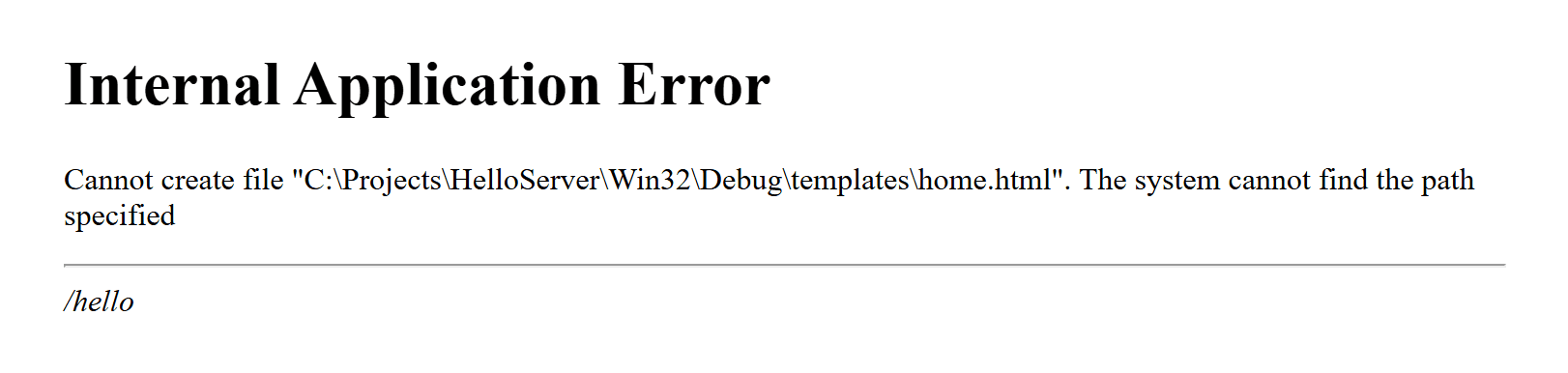
templates folder next to the executable, and WebBroker answers with its default 500 page.Now open http://localhost:8080/hello. The heading reads "Hello from WebStencils!", the list shows our three URLs, the last one marked as HTML, and the footer tells you when the page was rendered. Reload the page and the time changes: this is server-side rendering in its simplest form. The JSON URLs from the previous post work exactly as before -- and they are clickable now.
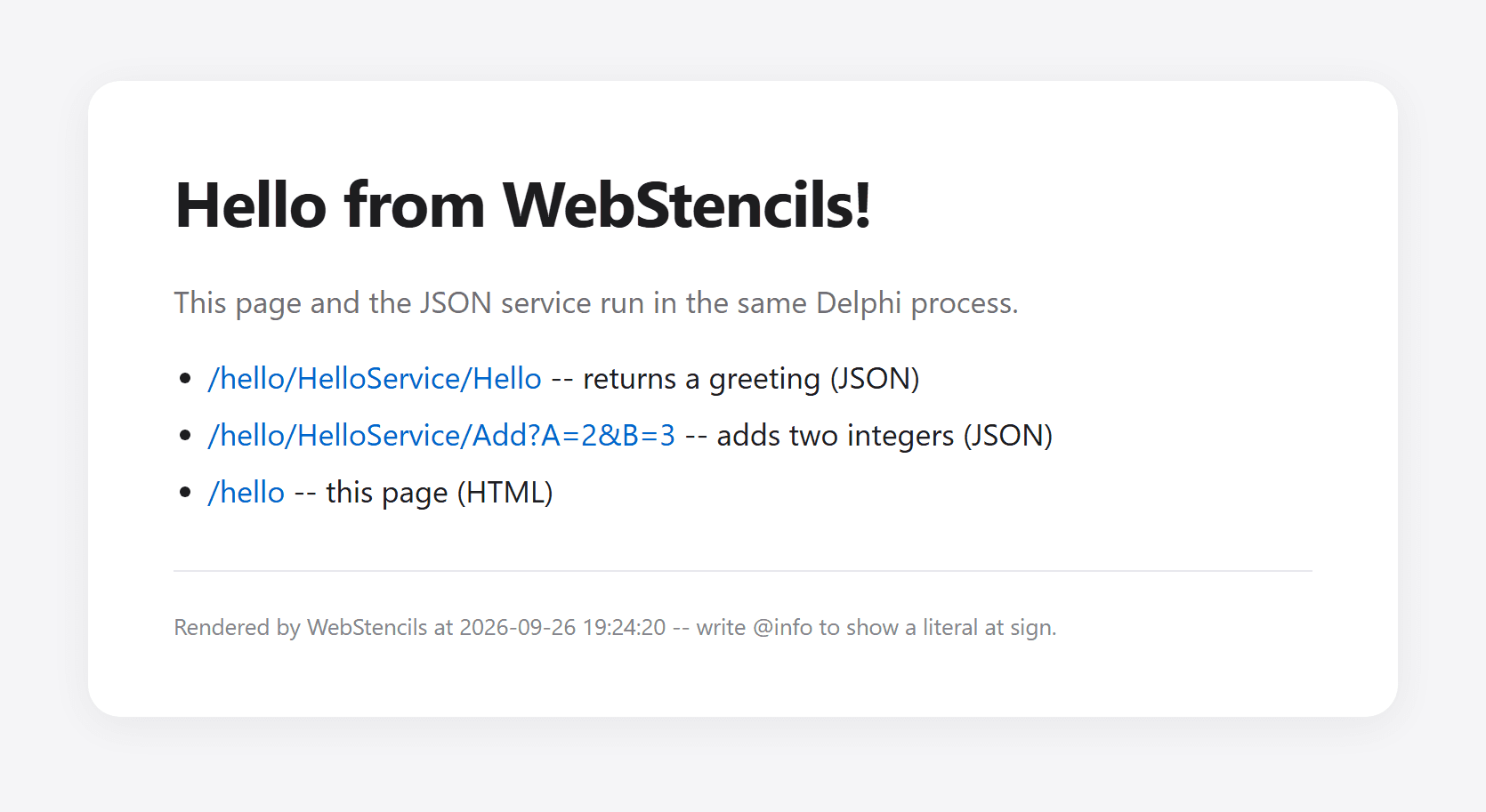
home.html inside layout.html, with the loop, the condition, and the render time in the footer.Where this introduction ends
I kept this first page deliberately small, and WebStencils can do a lot more. There are @Import for reusable fragments, @switch for multi-way decisions, and access to the request through @query. Since RAD Studio 13, it also works with WebBroker's new session management and authentication components, which Embarcadero's overview of the 13.0 changes describes. The same overview mentions a whitelist that controls which members a template may access. Be aware that, out of the box, it only restricts TDataSet and TStrings descendants; every public property of your own classes stays readable until you configure TWebStencilsProcessor.Whitelist yourself -- worth doing when your objects carry data that should never end up in a page.
Takeaways
We added server-rendered HTML to our WebBroker server with two template files, a unit with two plain classes, and one action handler. WebStencils reads properties of registered objects with @name.Property, loops with @ForEach, decides with @if, and shares a frame between pages with @LayoutPage and @RenderBody.
A WebStencils page is HTML with a few
@signs in it. The Delphi side only has to say which objects go by which names.
In the next post, we will replace the hard-coded list with real data: we will create an SQLite database in code -- file, table, and sample rows -- and render a table of customers straight from a FireDAC query. Until then, change the templates, add a property to TPageInfo, and see what happens. Enjoy!
Complete source code
For reference, here are the two files that changed compared to the previous post. The unchanged HelloWebModule.dfm and the templates are shown above.
program HelloServer;
{$APPTYPE CONSOLE}
uses
System.SysUtils,
Web.WebReq,
IdHTTPWebBrokerBridge,
HelloPageModel in 'HelloPageModel.pas',
HelloWebModule in 'HelloWebModule.pas' {HelloModule: TWebModule};
const
PORT = 8080;
var
Server: TIdHTTPWebBrokerBridge;
begin
try
// (1) tell WebBroker which class answers the requests
WebRequestHandler.WebModuleClass := THelloModule;
// (2) the HTTP server: Indy, bridged to WebBroker
Server := TIdHTTPWebBrokerBridge.Create(nil);
try
Server.DefaultPort := PORT;
Server.Active := True;
WriteLn('WebBroker server running on port ', PORT);
WriteLn('Try: http://localhost:8080/hello');
WriteLn('Press Enter to stop.');
ReadLn;
Server.Active := False;
finally
Server.Free;
end;
except
on E: Exception do
begin
WriteLn(E.ClassName, ': ', E.Message);
ExitCode := 1;
end;
end;
end.unit HelloWebModule;
interface
uses
System.SysUtils,
System.Classes,
System.JSON,
Web.HTTPApp;
type
THelloModule = class(TWebModule)
private
procedure AddRoute(const APathInfo: string; AMethod: TMethodType;
AHandler: THTTPMethodEvent; ADefault: Boolean = False);
procedure SendJson(Response: TWebResponse; AStatusCode: Integer;
AJson: TJSONObject);
procedure Cors(Sender: TObject; Request: TWebRequest;
Response: TWebResponse; var Handled: Boolean);
procedure HelloAction(Sender: TObject; Request: TWebRequest;
Response: TWebResponse; var Handled: Boolean);
procedure AddAction(Sender: TObject; Request: TWebRequest;
Response: TWebResponse; var Handled: Boolean);
procedure HomeAction(Sender: TObject; Request: TWebRequest;
Response: TWebResponse; var Handled: Boolean);
procedure NotFoundAction(Sender: TObject; Request: TWebRequest;
Response: TWebResponse; var Handled: Boolean);
public
constructor Create(AOwner: TComponent); override;
end;
implementation
uses
System.IOUtils,
System.Generics.Collections,
Web.Stencils,
HelloPageModel;
{$R *.dfm}
function TemplateFileName(const AName: string): string;
begin
// the templates folder sits next to the executable
Result := TPath.Combine(
TPath.Combine(ExtractFilePath(ParamStr(0)), 'templates'), AName);
end;
{ THelloModule }
constructor THelloModule.Create(AOwner: TComponent);
begin
inherited;
// (1) runs before any action -- adds the CORS headers
BeforeDispatch := Cors;
// (2) one action per URL
AddRoute('/hello/HelloService/Hello', mtGet, HelloAction);
AddRoute('/hello/HelloService/Add', mtGet, AddAction);
AddRoute('/hello', mtGet, HomeAction);
// (3) the default action answers everything else
AddRoute('', mtAny, NotFoundAction, True);
end;
procedure THelloModule.AddRoute(const APathInfo: string; AMethod: TMethodType;
AHandler: THTTPMethodEvent; ADefault: Boolean);
var
Item: TWebActionItem;
begin
Item := Actions.Add;
Item.PathInfo := APathInfo;
Item.MethodType := AMethod;
Item.Default := ADefault;
Item.OnAction := AHandler;
end;
procedure THelloModule.SendJson(Response: TWebResponse; AStatusCode: Integer;
AJson: TJSONObject);
begin
try
Response.StatusCode := AStatusCode;
Response.ContentType := 'application/json; charset=utf-8';
Response.Content := AJson.ToJSON;
finally
AJson.Free;
end;
end;
procedure THelloModule.Cors(Sender: TObject; Request: TWebRequest;
Response: TWebResponse; var Handled: Boolean);
begin
// (4) CORS: '*' allows EVERY origin, which effectively switches the
// browser's cross-origin protection off for this server. Fine for
// development; in production, replace '*' with the origin of your
// web application, e.g. 'https://app.example.com'.
Response.SetCustomHeader('Access-Control-Allow-Origin', '*');
// (5) answer the browser's preflight request right here
if SameText(Request.Method, 'OPTIONS') then
begin
Response.SetCustomHeader('Access-Control-Allow-Methods', 'GET, OPTIONS');
Response.SetCustomHeader('Access-Control-Allow-Headers', 'Content-Type');
Response.StatusCode := 204;
Handled := True;
end;
end;
procedure THelloModule.HelloAction(Sender: TObject; Request: TWebRequest;
Response: TWebResponse; var Handled: Boolean);
begin
SendJson(Response, 200,
TJSONObject.Create.AddPair('value', 'Hello from WebBroker!'));
end;
procedure THelloModule.AddAction(Sender: TObject; Request: TWebRequest;
Response: TWebResponse; var Handled: Boolean);
var
A, B: Integer;
begin
// (6) nobody converts the parameters for us -- we do it ourselves
if TryStrToInt(Request.QueryFields.Values['A'], A) and
TryStrToInt(Request.QueryFields.Values['B'], B) then
SendJson(Response, 200,
TJSONObject.Create.AddPair('value', TJSONNumber.Create(A + B)))
else
SendJson(Response, 400,
TJSONObject.Create.AddPair('error', 'A and B must be integers'));
end;
procedure THelloModule.HomeAction(Sender: TObject; Request: TWebRequest;
  Response: TWebResponse; var Handled: Boolean);
var
  Processor: TWebStencilsProcessor;
  Endpoints: TObjectList<TEndpoint>;
begin
  Processor := TWebStencilsProcessor.Create(nil);
  try
    // (7) the page to render; it names its own layout
    Processor.InputFileName := TemplateFileName('home.html');

    // (8) the data -- True hands ownership to the processor
    Processor.AddVar('info', TPageInfo.Create('Hello from WebStencils!'), True);

    Endpoints := TObjectList<TEndpoint>.Create;
    Endpoints.Add(TEndpoint.Create('/hello/HelloService/Hello',
      'returns a greeting', False));
    Endpoints.Add(TEndpoint.Create('/hello/HelloService/Add?A=2&B=3',
      'adds two integers', False));
    Endpoints.Add(TEndpoint.Create('/hello', 'this page', True));
    Processor.AddVar('endpoints', Endpoints, True);

    // (9) Content runs the template engine and returns the HTML
    Response.ContentType := 'text/html; charset=utf-8';
    Response.Content := Processor.Content;
  finally
    Processor.Free;
  end;
end;
procedure THelloModule.NotFoundAction(Sender: TObject; Request: TWebRequest;
Response: TWebResponse; var Handled: Boolean);
begin
SendJson(Response, 404,
TJSONObject.Create.AddPair('error', 'Not found: ' + Request.PathInfo));
end;
end.