Barcodes and QR codes are everywhere. Product labels, warehouse management systems, invoices, event tickets, asset tracking, mobile deep links — if you're building business software, sooner or later someone will ask for them. My friends at TMS Software — a company I had the privilege of working with for seven years as their evangelist — just released a fantastic new open-source library that makes this a native, dependency-free experience for Delphi VCL developers.
It's called Bar&QRCodes4D, and it's completely free.
Why Native Delphi Matters
Before we dive into the code, let's talk about what "native Delphi" actually means for your deployment story. Many barcode solutions require shipping an external DLL, calling a web service, or relying on a third-party runtime. With Bar&QRCodes4D, none of that applies:
- No external DLL to deploy
- No server-side generation
- No internet connection required
- Full Delphi source code included
- Drops right into existing VCL projects
- Direct PNG and SVG export built in
That's a clean bill of health for any enterprise environment with strict dependency policies.
Getting Started with Barcodes
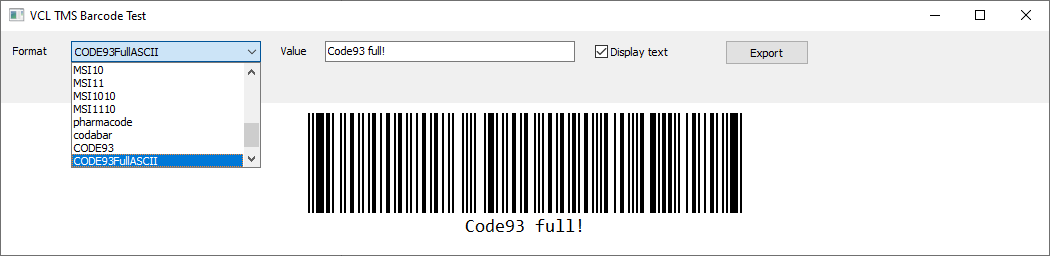
After adding the units to your project (or installing the package), barcode rendering is as simple as dropping a TTMSBarCode component on your form and setting two properties:
uses
  TMSBarCode;

procedure TForm1.FormCreate(Sender: TObject);
begin
  TMSBarCode1.BarcodeType := tbcCODE128;
  TMSBarCode1.Value := 'TMS-123456789';
end;
The component renders directly onto the VCL form — no canvas hackery needed.
Supported Barcode Formats
The library covers the most common barcode standards you'll encounter in business applications.
EAN-13 — the international retail standard:
procedure TForm1.GenerateEAN13;
begin
  TMSBarCode1.BarcodeType := tbcEAN13;
  TMSBarCode1.Value := '5412345678908';
end;
Code 39 — popular in industrial and logistics applications:
procedure TForm1.GenerateCode39;
begin
  TMSBarCode1.BarcodeType := tbcCODE39;
  TMSBarCode1.Value := 'TMSCODE39';
end;
Interleaved 2 of 5 (ITF) — common in shipping and distribution:
procedure TForm1.GenerateITF;
begin
  TMSBarCode1.BarcodeType := tbcITF;
  TMSBarCode1.Value := '1234567890';
end;
Customizing the Appearance
The component exposes a clean set of styling properties so you can match your application's design or label specification requirements:
procedure TForm1.SetupBarcodeStyle;
begin
  TMSBarCode1.BarColor        := clBlack;
  TMSBarCode1.BackgroundColor := clWhite;
  TMSBarCode1.ModuleWidth     := 2;
  TMSBarCode1.BarHeight       := 100;
  TMSBarCode1.Margin          := 10;
  TMSBarCode1.DisplayValue    := True;
end;
Whether you're targeting screen display, label printing, or embedded report generation, these properties give you enough control to get the output right without fighting the component.
Validating Before You Print
One of the things I appreciate most as a developer is graceful error handling. Not all barcode formats accept arbitrary input — EAN-13 requires exactly 13 digits, ITF requires even-length numeric strings, and so on. Bar&QRCodes4D gives you a TryEncode method to validate before committing to a print job or export:
procedure TForm1.ValidateBarcode;
var
  LPattern: string;
  LText: string;
begin
  if TMSBarCode1.TryEncode(LPattern, LText) then
    ShowMessage('Barcode generated successfully')
  else
    ShowMessage(TMSBarCode1.LastError);
end;
This small detail saves a lot of frustration when user input drives the barcode value dynamically.
Exporting to PNG and SVG
Need to embed a barcode in a PDF report, email attachment, or label template? Both PNG and SVG export are built right in:
// Raster export — great for email, direct printing
procedure TForm1.SaveBarcodeAsPNG;
begin
  TMSBarCode1.SaveToPNG('c:\temp\barcode.png');
end;

// Vector export — ideal for scalable printing and label design
procedure TForm1.SaveBarcodeAsSVG;
begin
  TMSBarCode1.SaveToSVG('c:\temp\barcode.svg');
end;
SVG export is particularly valuable if your workflow involves label design tools or high-resolution commercial printing — vector graphics scale to any size without quality loss.
QR Codes Are Just as Simple
The TTMSQRCode component follows the same design philosophy. Assign a value and you're done:
uses
  TMSQRCode;

procedure TForm1.FormCreate(Sender: TObject);
begin
  TMSQRCode1.Value := 'https://www.tmssoftware.com';
end;
Point a phone camera at it, and it just works.
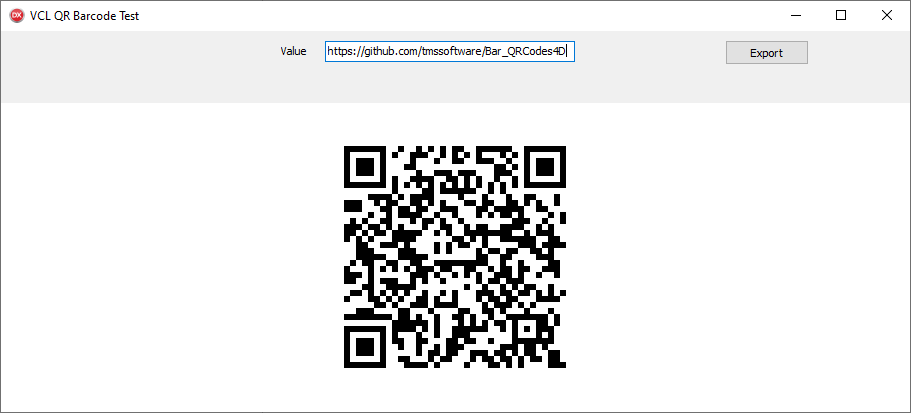
Generating from user input is equally straightforward — useful for URL shorteners, contact cards, product lookups, or any scenario where the content is dynamic:
procedure TForm1.ButtonGenerateClick(Sender: TObject);
begin
  TMSQRCode1.Value := EditQRCodeText.Text;
end;
And of course, the same PNG/SVG export API applies:
procedure TForm1.SaveQRCode;
begin
  TMSQRCode1.SaveToPNG('c:\temp\qrcode.png');
  TMSQRCode1.SaveToSVG('c:\temp\qrcode.svg');
end;
Printing Directly from VCL
Because the components render natively, they slot directly into standard VCL printing workflows using Vcl.Printers:
uses
  Vcl.Printers;

procedure TForm1.PrintBarcode;
begin
  Printer.BeginDoc;
  try
    TMSBarCode1.PaintTo(Printer.Canvas.Handle, 100, 100);
  finally
    Printer.EndDoc;
  end;
end;
No wrapper libraries, no intermediate formats — just native VCL painting onto the printer canvas. It really doesn't get simpler than that.
Install using TMS Smart Setup
Installing Bar&QRCodes4D is a breeze with TMS Smart Setup. One line in the command prompt, and you're ready to go:
tms install tms.barcodeFinal Thoughts
I've watched TMS Software build and refine their component ecosystem for years, and Bar&QRCodes4D is a great example of what they do well: identify a practical, everyday developer need and build something clean and dependency-free around it. If you're writing VCL applications that deal with inventory, logistics, ticketing, or any kind of label printing, this library deserves a place in your toolbox.
It's open source, it's free, and it's pure Delphi. Go grab it.
🔗 Source code and demo projects: https://github.com/tmssoftware/Bar_QRCodes4D
Holger Flick is an independent Delphi consultant, educator, and GitKraken Ambassador at FlixEngineering, LLC. He was TMS Software's evangelist for seven years and continues to work extensively with the TMS component ecosystem.