In the previous post, our first WebStencils page rendered a list of objects that we created in code. That was fine for learning the syntax, but no real page looks like that. Real pages show data from a database, and that is what we will do today.
There is one requirement I set for myself: the database must not be something you have to download, restore, or set up by hand. The server creates it. On the first start, it creates the SQLite file, the table, and a handful of sample rows. On every later start, it finds everything in place and leaves it alone. I have lost count of the sample projects I could not run because a database file was missing or a script referred to a path on somebody else's machine -- let's not add another one.
We will use SQLite, which keeps a whole database in a single file and needs no server, and FireDAC, Delphi's database library. Both ship with Delphi, so the stack stays the same as in the whole series: nothing to install on top of Delphi.
What we are building
Before we start, let's look at when each part of the code runs, because there are two distinct moments. The program creates the database exactly once, at startup, before the HTTP server accepts the first request. After that, every request for the customers page opens a query on the connection of its web module and hands it to WebStencils.
The dotted line from the web module to the file is the important detail: every web module talks to the same database file through its own connection. Remember from the first post of this series that WebBroker creates one web module per concurrent request. That is exactly why each module can own a connection without any locking of our own -- and also why SQLite has to let several open connections share the file for reading and writing, which, as we will see, FireDAC's default does not.
If FireDAC is new to you, my earlier post on Delphi and PostgreSQL from scratch builds a FireDAC application step by step, including creating a database in code. Today, SQLite makes that part considerably shorter.
Step 1: Create the database in code
Everything that concerns the database goes into one unit. Create CustomerData.pas:
unit CustomerData;

interface

uses
  FireDAC.Comp.Client;

function DatabaseFileName: string;
function CreateConnection: TFDConnection;
procedure CreateDatabase;

implementation

uses
  System.SysUtils,
  System.IOUtils,
  FireDAC.Stan.Def,
  FireDAC.Stan.Async,
  FireDAC.DApt,
  FireDAC.Phys.SQLite,
  FireDAC.Phys.SQLiteWrapper.Stat,
  FireDAC.ConsoleUI.Wait;

const
  SEED: array[0..5, 0..1] of string = (
    ('Los Pollos Hermanos', 'Albuquerque'),
    ('Wayne Enterprises', 'Gotham City'),
    ('Dunder Mifflin', 'Scranton'),
    ('Cyberdyne Systems', 'Sunnyvale'),
    ('Oscorp', 'New York'),
    ('Stark Industries', 'New York'));

function DatabaseFileName: string;
begin
  // the database file sits next to the executable
  Result := TPath.Combine(ExtractFilePath(ParamStr(0)), 'customers.sqlite3');
end;

function CreateConnection: TFDConnection;
begin
  Result := TFDConnection.Create(nil);
  Result.LoginPrompt := False;
  Result.Params.DriverID := 'SQLite';
  Result.Params.Database := DatabaseFileName;

  // (1) create the file if it does not exist yet
  Result.Params.Values['OpenMode'] := 'CreateUTF8';

  // (2) FireDAC opens SQLite exclusively by default; several web
  // modules with their own connections need shared access
  Result.Params.Values['LockingMode'] := 'Normal';
  Result.Params.Values['SharedCache'] := 'False';
end;

procedure CreateDatabase;
var
  Connection: TFDConnection;
  I: Integer;
begin
  Connection := CreateConnection;
  try
    Connection.Connected := True;

    // (3) the schema -- safe to run on every start
    Connection.ExecSQL(
      'CREATE TABLE IF NOT EXISTS customers (' +
      '  id INTEGER PRIMARY KEY AUTOINCREMENT,' +
      '  name TEXT NOT NULL,' +
      '  city TEXT NOT NULL)');

    // (4) sample data, but only into an empty table
    if Connection.ExecSQLScalar('SELECT COUNT(*) FROM customers') = 0 then
    begin
      Connection.StartTransaction;
      try
        for I := Low(SEED) to High(SEED) do
          Connection.ExecSQL(
            'INSERT INTO customers (name, city) VALUES (:name, :city)',
            [SEED[I, 0], SEED[I, 1]]);
        Connection.Commit;
      except
        Connection.Rollback;
        raise;
      end;
    end;
  finally
    Connection.Free;
  end;
end;

end.
The numbered comments, in order:
OpenMode=CreateUTF8tells the FireDAC SQLite driver to create the database file if it does not exist yet. That is the default, but in a unit whose whole purpose is creating a database, I prefer to say it out loud.LockingMode=Normalis the line that will save you an afternoon. FireDAC opens SQLite databases in exclusive locking mode by default, which is the fastest option as long as only one connection exists. In exclusive mode, a connection that has read from the file keeps its lock until the connection closes. Our read-only page does not notice: I removed the line, fired 20 parallel requests at the server, and every one of them returned all six rows. The trap springs with the first write. Our web modules keep their connections open for as long as they live, so any other connection that tries to write -- another web module, or a database tool on your desktop -- fails withdatabase is locked. Normal mode releases the locks after each transaction, andSharedCache=Falsegives each connection its own cache. The SQLite database in Embarcadero's own WebStencils demos is configured with exactly these two settings.CREATE TABLE IF NOT EXISTSis safe to run on every start. On the first start, it creates the table; on every later one, it does nothing.- The sample rows go in only when the table is empty, so restarting the server does not duplicate them. They are inserted in one transaction, which leaves nothing half-done if an insert fails. It is also faster: without an explicit transaction, every single
INSERTis its own transaction, which the SQLite FAQ names as the classic reason for slow inserts.
Note the units in the implementation section. FireDAC.Phys.SQLite registers the driver, and FireDAC.Phys.SQLiteWrapper.Stat links the SQLite engine statically into the executable, so there is no sqlite3.dll to deploy. FireDAC.ConsoleUI.Wait provides FireDAC's wait cursor for a console application. In my tests with RAD Studio 13, the server also ran without it, because FireDAC treats every thread except the main thread as silent and never asks for a wait cursor there. Still, any code path that does ask for one without a wait unit linked in stops with a "factory missing" error, and the unit costs nothing, so I keep it. The WebBroker project in the WebStencils demos uses the same units for its SQLite database.
Also note that the sample data is made-up companies from films and TV. If you receive a lawsuit from Wayne Enterprises, I did not tell you to insert that row.
Step 2: Create the database at startup
The program calls CreateDatabase before it starts listening. Add CustomerData to the uses clause of HelloServer.dpr and extend the beginning of the main block:
    // (0) create the database file, table, and sample data if needed
    CreateDatabase;
    WriteLn('Database: ', DatabaseFileName);

    // (1) tell WebBroker which class answers the requests
    WebRequestHandler.WebModuleClass := THelloModule;
If creating the database fails -- for example, because the folder is read-only -- the exception ends up in the existing except block, and the server never starts. That is intentional. A web server that starts without its database only moves the error to the first request, where it is much harder to spot.
Step 3: Query the database in the web module
The web module gets a connection of its own. Add FireDAC.Comp.Client to the uses clause of the interface section and CustomerData to the one in the implementation section, then add a field and a destructor to the class:
  THelloModule = class(TWebModule)
  private
    FConnection: TFDConnection;
    procedure AddRoute(const APathInfo: string; AMethod: TMethodType;
      AHandler: THTTPMethodEvent; ADefault: Boolean = False);
    procedure SendJson(Response: TWebResponse; AStatusCode: Integer;
      AJson: TJSONObject);
    procedure Cors(Sender: TObject; Request: TWebRequest;
      Response: TWebResponse; var Handled: Boolean);
    procedure HelloAction(Sender: TObject; Request: TWebRequest;
      Response: TWebResponse; var Handled: Boolean);
    procedure AddAction(Sender: TObject; Request: TWebRequest;
      Response: TWebResponse; var Handled: Boolean);
    procedure HomeAction(Sender: TObject; Request: TWebRequest;
      Response: TWebResponse; var Handled: Boolean);
    procedure CustomersAction(Sender: TObject; Request: TWebRequest;
      Response: TWebResponse; var Handled: Boolean);
    procedure NotFoundAction(Sender: TObject; Request: TWebRequest;
      Response: TWebResponse; var Handled: Boolean);
  public
    constructor Create(AOwner: TComponent); override;
    destructor Destroy; override;
  end;
The constructor creates the connection and registers the new route; the destructor frees the connection:
constructor THelloModule.Create(AOwner: TComponent);
begin
  inherited;

  // (10) every web module instance gets its own connection
  FConnection := CreateConnection;

  // (1) runs before any action -- adds the CORS headers
  BeforeDispatch := Cors;

  // (2) one action per URL
  AddRoute('/hello/HelloService/Hello', mtGet, HelloAction);
  AddRoute('/hello/HelloService/Add', mtGet, AddAction);
  AddRoute('/hello', mtGet, HomeAction);
  AddRoute('/hello/customers', mtGet, CustomersAction);

  // (3) the default action answers everything else
  AddRoute('', mtAny, NotFoundAction, True);
end;

destructor THelloModule.Destroy;
begin
  FConnection.Free;
  inherited;
end;
Note that we only create the connection here. It opens on the first query, so a web module that only ever answers JSON never touches the database. The handler for the new page looks like this:
procedure THelloModule.CustomersAction(Sender: TObject; Request: TWebRequest;
  Response: TWebResponse; var Handled: Boolean);
var
  Query: TFDQuery;
  Processor: TWebStencilsProcessor;
  City: string;
begin
  City := Request.QueryFields.Values['city'];

  Query := TFDQuery.Create(nil);
  try
    Query.Connection := FConnection;

    // (11) user input only ever travels as a parameter
    if City = '' then
      Query.Open('SELECT id, name, city FROM customers ORDER BY name')
    else
      Query.Open('SELECT id, name, city FROM customers ' +
        'WHERE city = :city ORDER BY name', [City]);

    Processor := TWebStencilsProcessor.Create(nil);
    try
      Processor.InputFileName := TemplateFileName('customers.html');
      Processor.AddVar('info', TPageInfo.Create('Customers'), True);

      // (12) the open query IS the data -- False: the processor
      // must not free it, we do that ourselves
      Processor.AddVar('customers', Query, False);

      Response.ContentType := 'text/html; charset=utf-8';
      Response.Content := Processor.Content;
    finally
      Processor.Free;
    end;
  finally
    Query.Free;
  end;
end;
The numbers continue from the previous posts:
- Each web module instance creates its own
TFDConnectionin the constructor and frees it in the destructor. Since WebBroker never runs two requests on the same module at the same time, no two threads share a connection. - The optional
cityquery parameter filters the list. It only ever travels to the database as a parameter (:city), never as part of the SQL string. Thus, whatever a user puts into the URL, it cannot change the statement. I know you know this. I still see string-concatenated SQL in production code often enough to write it down every single time. - The open query is passed to WebStencils directly. There is no list of objects and no mapping code: WebStencils iterates the rows of a dataset and reads the fields by name. The third parameter is
Falsethis time, because the query belongs to us and is freed in our ownfinallyblock. Hand ownership to the processor and you free the query twice.
Step 4: The template
The template is where the dataset turns into a table. Save it as templates/customers.html:
@LayoutPage layout
<h1>@info.Title</h1>
<table>
  <thead>
    <tr><th>#</th><th>Name</th><th>City</th></tr>
  </thead>
  <tbody>
    @ForEach (var customer in customers) {
    <tr>
      <td>@customer.id</td>
      <td>@customer.name</td>
      <td><a href="/hello/customers?city=@customer.city">@customer.city</a></td>
    </tr>
    }
  </tbody>
</table>
<p><a href="/hello/customers">Show all customers</a> | <a href="/hello">Home</a></p>
@ForEach (var customer in customers) walks through the rows of the query, and @customer.name reads the field name of the current row -- the same syntax we used for object properties in the previous post. The field names are the column names from our SELECT. It uses the layout from the previous post, so the page gets the same frame and footer without a single extra line.
Each city is a link that filters the list by that city. The customers from New York are there for precisely this reason: a filter that always returns one row does not prove much.
Step 5: Run it
Copy the templates folder next to HelloServer.exe again -- it has a new file -- and start the server. The console now shows the path of the database file first.

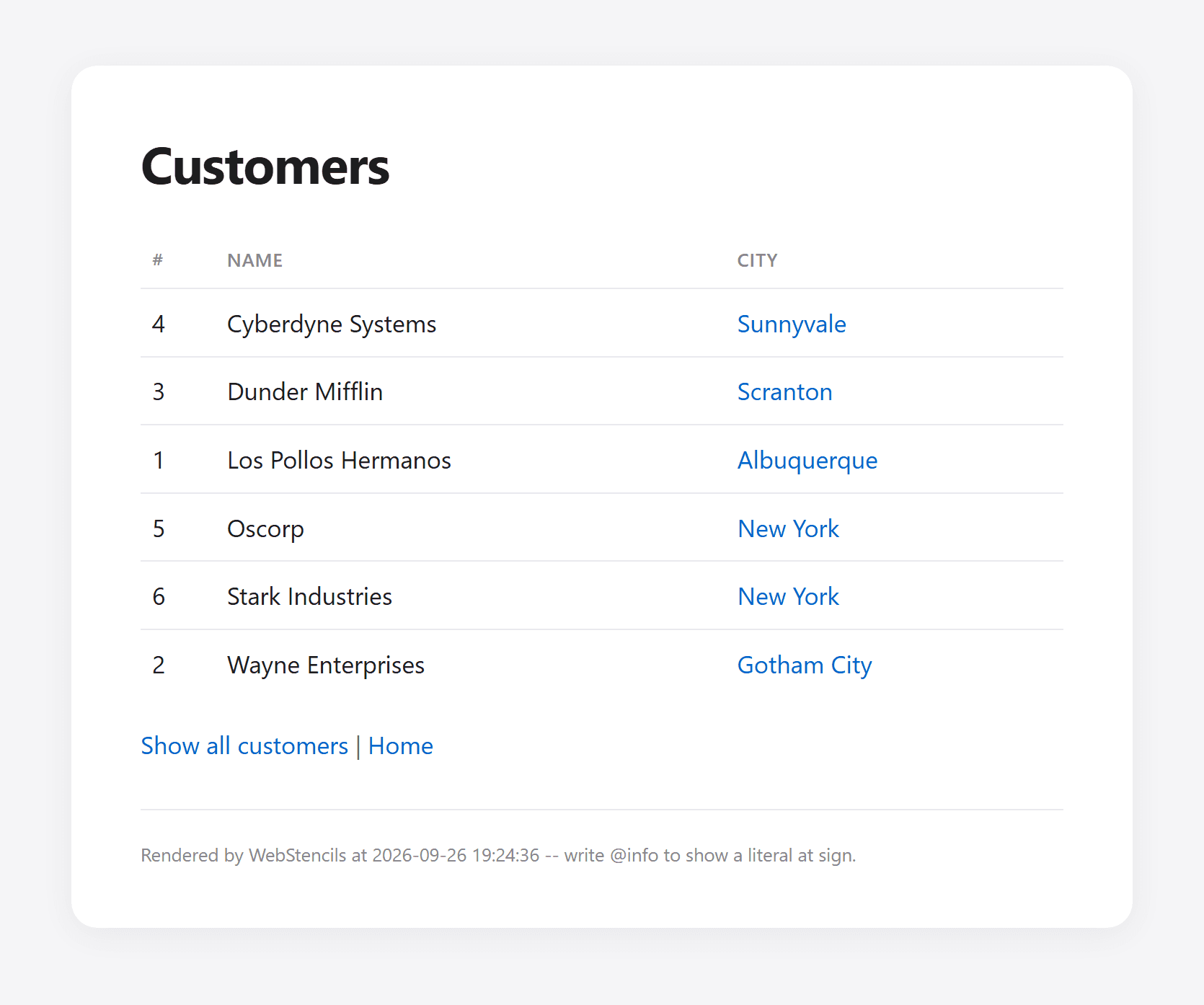
Open http://localhost:8080/hello/customers and you should see all six customers, sorted by name.
Click on New York and the list shrinks to Oscorp and Stark Industries. Neat.
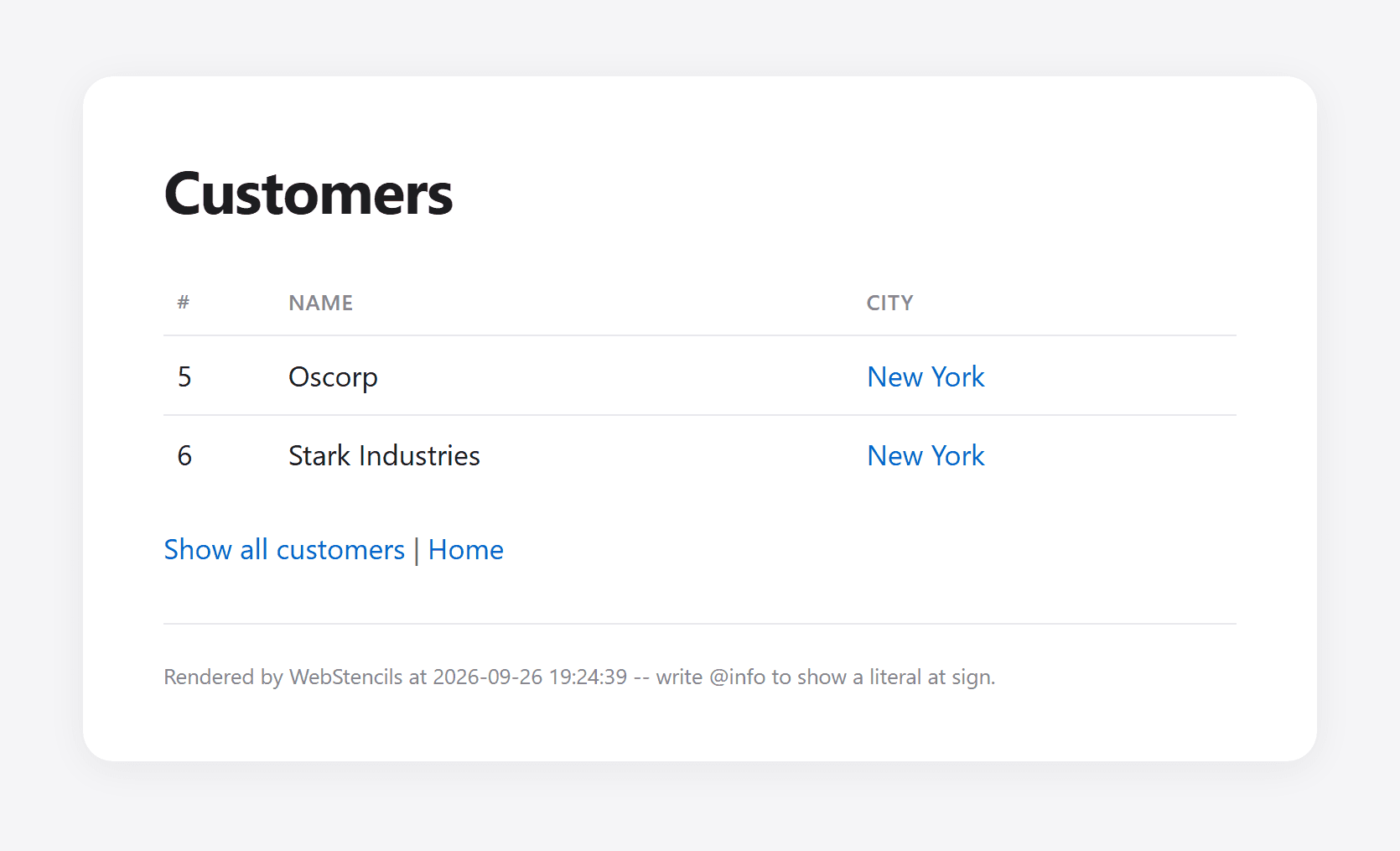
?city=New%20York; the city travels to SQLite as a parameter.Now stop the server and look next to the executable: there is customers.sqlite3. Start the server again, and nothing is inserted twice. Delete the file, and the next start creates it from scratch. That is the whole point of this exercise: the database is part of the code, not something you have to bring along.
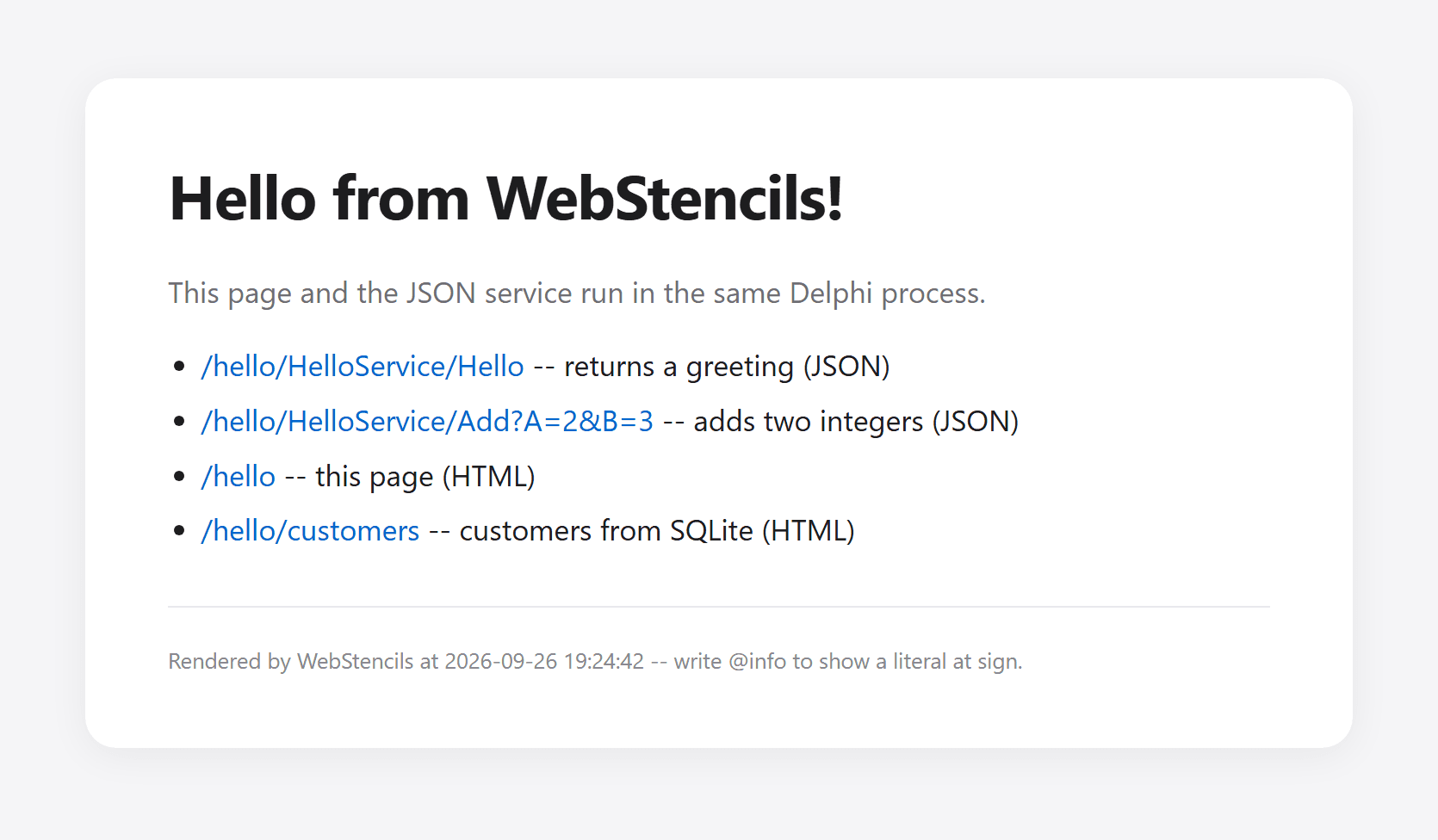
The JSON service from the first post and the home page from the second one still work, of course. Our small server now serves JSON, static-data HTML, and database-driven HTML from one executable.
Where this example ends
For a small internal tool, this structure goes a long way. You should know where it stops, though. CREATE TABLE IF NOT EXISTS is not a migration strategy: the first time you need to add a column to an existing database, you will want versioned schema changes. The page only reads data; forms that insert or edit customers are the obvious next step and need proper validation. And SQLite handles many readers very well but allows only one writer at a time, as the SQLite documentation on appropriate uses explains in detail. For a write-heavy service with many concurrent users, a database server like PostgreSQL is the better fit, and with FireDAC, switching is mostly a matter of the connection parameters.
Takeaways
We fed a WebStencils page from an SQLite database that the program creates on its own: file, table, and sample data on the first start, and no changes on every start after that. Three details carry the example. LockingMode=Normal lets every web module keep its own connection open without locking out every writer. Query parameters keep user input out of the SQL. And WebStencils iterates a FireDAC query directly, reading fields by name.
The best sample database is the one nobody has to download.
This concludes the first steps of our series. We started with a JSON service, added server-rendered HTML, and connected a database -- all with WebBroker, WebStencils, and FireDAC. Only by making changes will you get comfortable with it, so add a form that inserts a customer next, and imagine the possibilities you have now...
Complete source code
For reference, here are the complete files that changed compared to the previous post. The unchanged HelloPageModel.pas, HelloWebModule.dfm, and the templates from the previous posts complete the project.
program HelloServer;

{$APPTYPE CONSOLE}

uses
  System.SysUtils,
  Web.WebReq,
  IdHTTPWebBrokerBridge,
  HelloPageModel in 'HelloPageModel.pas',
  CustomerData in 'CustomerData.pas',
  HelloWebModule in 'HelloWebModule.pas' {HelloModule: TWebModule};

const
  PORT = 8080;

var
  Server: TIdHTTPWebBrokerBridge;
begin
  try
    // (0) create the database file, table, and sample data if needed
    CreateDatabase;
    WriteLn('Database: ', DatabaseFileName);

    // (1) tell WebBroker which class answers the requests
    WebRequestHandler.WebModuleClass := THelloModule;

    // (2) the HTTP server: Indy, bridged to WebBroker
    Server := TIdHTTPWebBrokerBridge.Create(nil);
    try
      Server.DefaultPort := PORT;
      Server.Active := True;

      WriteLn('WebBroker server running on port ', PORT);
      WriteLn('Try: http://localhost:8080/hello/customers');
      WriteLn('Press Enter to stop.');
      ReadLn;

      Server.Active := False;
    finally
      Server.Free;
    end;
  except
    on E: Exception do
    begin
      WriteLn(E.ClassName, ': ', E.Message);
      ExitCode := 1;
    end;
  end;
end.unit HelloWebModule;
interface
uses
System.SysUtils,
System.Classes,
System.JSON,
Web.HTTPApp,
FireDAC.Comp.Client;
type
THelloModule = class(TWebModule)
private
FConnection: TFDConnection;
procedure AddRoute(const APathInfo: string; AMethod: TMethodType;
AHandler: THTTPMethodEvent; ADefault: Boolean = False);
procedure SendJson(Response: TWebResponse; AStatusCode: Integer;
AJson: TJSONObject);
procedure Cors(Sender: TObject; Request: TWebRequest;
Response: TWebResponse; var Handled: Boolean);
procedure HelloAction(Sender: TObject; Request: TWebRequest;
Response: TWebResponse; var Handled: Boolean);
procedure AddAction(Sender: TObject; Request: TWebRequest;
Response: TWebResponse; var Handled: Boolean);
procedure HomeAction(Sender: TObject; Request: TWebRequest;
Response: TWebResponse; var Handled: Boolean);
procedure CustomersAction(Sender: TObject; Request: TWebRequest;
Response: TWebResponse; var Handled: Boolean);
procedure NotFoundAction(Sender: TObject; Request: TWebRequest;
Response: TWebResponse; var Handled: Boolean);
public
constructor Create(AOwner: TComponent); override;
destructor Destroy; override;
end;
implementation
uses
System.IOUtils,
System.Generics.Collections,
Web.Stencils,
HelloPageModel,
CustomerData;
{$R *.dfm}
function TemplateFileName(const AName: string): string;
begin
// the templates folder sits next to the executable
Result := TPath.Combine(
TPath.Combine(ExtractFilePath(ParamStr(0)), 'templates'), AName);
end;
{ THelloModule }
constructor THelloModule.Create(AOwner: TComponent);
begin
inherited;
// (10) every web module instance gets its own connection
FConnection := CreateConnection;
// (1) runs before any action -- adds the CORS headers
BeforeDispatch := Cors;
// (2) one action per URL
AddRoute('/hello/HelloService/Hello', mtGet, HelloAction);
AddRoute('/hello/HelloService/Add', mtGet, AddAction);
AddRoute('/hello', mtGet, HomeAction);
AddRoute('/hello/customers', mtGet, CustomersAction);
// (3) the default action answers everything else
AddRoute('', mtAny, NotFoundAction, True);
end;
destructor THelloModule.Destroy;
begin
FConnection.Free;
inherited;
end;
procedure THelloModule.AddRoute(const APathInfo: string; AMethod: TMethodType;
AHandler: THTTPMethodEvent; ADefault: Boolean);
var
Item: TWebActionItem;
begin
Item := Actions.Add;
Item.PathInfo := APathInfo;
Item.MethodType := AMethod;
Item.Default := ADefault;
Item.OnAction := AHandler;
end;
procedure THelloModule.SendJson(Response: TWebResponse; AStatusCode: Integer;
AJson: TJSONObject);
begin
try
Response.StatusCode := AStatusCode;
Response.ContentType := 'application/json; charset=utf-8';
Response.Content := AJson.ToJSON;
finally
AJson.Free;
end;
end;
procedure THelloModule.Cors(Sender: TObject; Request: TWebRequest;
Response: TWebResponse; var Handled: Boolean);
begin
// (4) CORS: '*' allows EVERY origin, which effectively switches the
// browser's cross-origin protection off for this server. Fine for
// development; in production, replace '*' with the origin of your
// web application, e.g. 'https://app.example.com'.
Response.SetCustomHeader('Access-Control-Allow-Origin', '*');
// (5) answer the browser's preflight request right here
if SameText(Request.Method, 'OPTIONS') then
begin
Response.SetCustomHeader('Access-Control-Allow-Methods', 'GET, OPTIONS');
Response.SetCustomHeader('Access-Control-Allow-Headers', 'Content-Type');
Response.StatusCode := 204;
Handled := True;
end;
end;
procedure THelloModule.HelloAction(Sender: TObject; Request: TWebRequest;
Response: TWebResponse; var Handled: Boolean);
begin
SendJson(Response, 200,
TJSONObject.Create.AddPair('value', 'Hello from WebBroker!'));
end;
procedure THelloModule.AddAction(Sender: TObject; Request: TWebRequest;
Response: TWebResponse; var Handled: Boolean);
var
A, B: Integer;
begin
// (6) nobody converts the parameters for us -- we do it ourselves
if TryStrToInt(Request.QueryFields.Values['A'], A) and
TryStrToInt(Request.QueryFields.Values['B'], B) then
SendJson(Response, 200,
TJSONObject.Create.AddPair('value', TJSONNumber.Create(A + B)))
else
SendJson(Response, 400,
TJSONObject.Create.AddPair('error', 'A and B must be integers'));
end;
procedure THelloModule.HomeAction(Sender: TObject; Request: TWebRequest;
Response: TWebResponse; var Handled: Boolean);
var
Processor: TWebStencilsProcessor;
Endpoints: TObjectList<TEndpoint>;
begin
Processor := TWebStencilsProcessor.Create(nil);
try
// (7) the page to render; it names its own layout
Processor.InputFileName := TemplateFileName('home.html');
// (8) the data -- True hands ownership to the processor
Processor.AddVar('info', TPageInfo.Create('Hello from WebStencils!'), True);
Endpoints := TObjectList<TEndpoint>.Create;
Endpoints.Add(TEndpoint.Create('/hello/HelloService/Hello',
'returns a greeting', False));
Endpoints.Add(TEndpoint.Create('/hello/HelloService/Add?A=2&B=3',
'adds two integers', False));
Endpoints.Add(TEndpoint.Create('/hello', 'this page', True));
Endpoints.Add(TEndpoint.Create('/hello/customers',
'customers from SQLite', True));
Processor.AddVar('endpoints', Endpoints, True);
// (9) Content runs the template engine and returns the HTML
Response.ContentType := 'text/html; charset=utf-8';
Response.Content := Processor.Content;
finally
Processor.Free;
end;
end;
procedure THelloModule.CustomersAction(Sender: TObject; Request: TWebRequest;
Response: TWebResponse; var Handled: Boolean);
var
Query: TFDQuery;
Processor: TWebStencilsProcessor;
City: string;
begin
City := Request.QueryFields.Values['city'];
Query := TFDQuery.Create(nil);
try
Query.Connection := FConnection;
// (11) user input only ever travels as a parameter
if City = '' then
Query.Open('SELECT id, name, city FROM customers ORDER BY name')
else
Query.Open('SELECT id, name, city FROM customers ' +
'WHERE city = :city ORDER BY name', [City]);
Processor := TWebStencilsProcessor.Create(nil);
try
Processor.InputFileName := TemplateFileName('customers.html');
Processor.AddVar('info', TPageInfo.Create('Customers'), True);
// (12) the open query IS the data -- False: the processor
// must not free it, we do that ourselves
Processor.AddVar('customers', Query, False);
Response.ContentType := 'text/html; charset=utf-8';
Response.Content := Processor.Content;
finally
Processor.Free;
end;
finally
Query.Free;
end;
end;
procedure THelloModule.NotFoundAction(Sender: TObject; Request: TWebRequest;
Response: TWebResponse; var Handled: Boolean);
begin
SendJson(Response, 404,
TJSONObject.Create.AddPair('error', 'Not found: ' + Request.PathInfo));
end;
end.