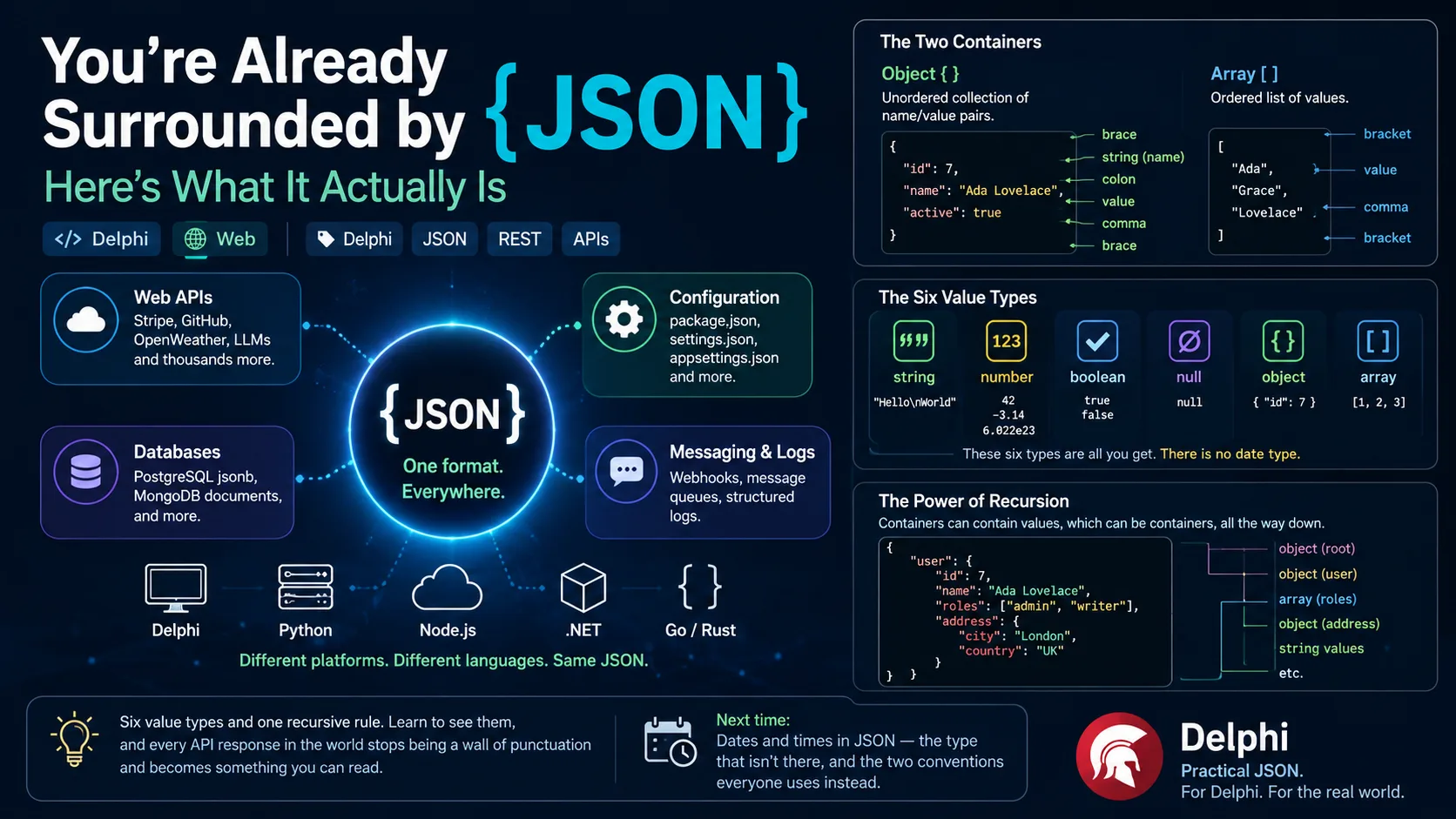
Open your editor right now and think about the last thing you built that talked to the outside world. A REST call to a payment provider. A config file your app reads on startup. A webhook from GitHub. The response from a weather service, a mapping API, an LLM. Almost every one of them spoke the same language on the wire — a little text format with curly braces and square brackets that you've probably typed a thousand times without ever stopping to ask what it really is.
That format is JSON, and this post is the start of a series about working with it in Delphi. Before we write a single line of Pascal, I want to do the unglamorous thing and get the foundation right: what JSON is, why the whole industry landed on it, why it keeps getting called "the thing that replaced XML," and — the part that actually matters when you sit down to parse or build it — the surprisingly small set of rules its entire data model is made of.
By the end you'll be able to look at any JSON document, however deeply nested, and see the handful of pieces it's assembled from. That mental model is the thing every library in this series — starting with the classes Delphi already ships — is built to manipulate.
Where you already meet JSON
Let's start with the claim in the title, because it's easy to prove. JSON isn't a niche format you opt into — it's the default carrier for structured data across most of modern software. A quick tour of where it shows up:
- Web APIs. The overwhelming majority of public REST APIs return JSON. When your Delphi app calls Stripe, GitHub, OpenWeather, or an LLM endpoint, the body that comes back is JSON text.
- Configuration files.
package.jsonin every Node.js project,tsconfig.json, VS Code'ssettings.json,appsettings.jsonin .NET — configuration has largely migrated to JSON. - Databases. PostgreSQL has first-class
jsonandjsonbcolumn types; MongoDB stores documents that are, for all practical purposes, JSON. - Messaging and logs. Webhooks, message queues, and structured log lines are routinely JSON objects, one per event.
The point of the diagram is not the boxes — it's the single node in the middle. Systems written in different languages, running on different machines, built by teams that never spoke to each other, all agree on one plain-text format to hand data back and forth. That agreement is JSON's entire reason for existing.
What JSON actually is
JSON stands for JavaScript Object Notation. It's a text format for representing structured data — a way to write down objects, lists, numbers, and text as a string that any program can produce and any program can read back.
Two things about that definition matter. First, it's text: a JSON document is just characters, encoded (per the current standard) as UTF-8. You can open it in Notepad, email it, paste it into a chat. Second, it's language-independent despite the name. The "JavaScript" in JSON is history, not a requirement: the syntax was borrowed from the way you write object and array literals in JavaScript, but the format itself belongs to no language. Delphi, Python, Rust, and COBOL all read and write the exact same JSON.
The history is worth a paragraph because it explains the shape of everything that follows. JSON was introduced by Douglas Crockford around 2001 — he's careful to say he discovered rather than invented it, because the notation was already sitting inside JavaScript, which itself drew the syntax from ECMAScript, standardised in 1999. The first JSON message was sent in April 2001. Crockford wrote it up on a small website so others could use it, and that was very nearly the whole specification. It was later formalised — as RFC 4627 in 2006, then as the standard ECMA-404 in 2013, and today as RFC 8259 (Internet Standard STD 90, 2017), which the two standards bodies deliberately kept identical.
Why it became so popular
Plenty of data formats have come and gone. JSON stuck, and it's worth being precise about why, because the reasons are also the reasons it's occasionally the wrong choice.
The honest short answer is that JSON is just enough. It's human-readable, so you can eyeball a response and understand it without tooling. It maps almost perfectly onto the data structures programmers already think in — objects (records) and arrays (lists) — so turning a JSON document into program data and back feels natural in nearly every language. It's compact enough for the wire without being cryptic. And the grammar is small enough that a competent developer can hold all of it in their head, and a parser for it can be written in an afternoon.
That last property is underrated. A format that's trivial to parse gets a high-quality parser in every language quickly, and once every language can read a format cheaply and correctly, the network effect does the rest. JSON became the default not because it's the most capable format, but because it removed the most friction.
The XML question: why JSON keeps getting called "the next thing after XML"
If you've been in this industry long enough, you've heard JSON framed as the format that "replaced XML." That framing is half right, and the half that's wrong is worth untangling.
XML — Extensible Markup Language — was the dominant interchange format through the late 1990s and 2000s. It's powerful: namespaces, schemas (XSD), transformation (XSLT), a full query language (XPath/XQuery), and the ability to mix data and marked-up text in one document. For a lot of that power, though, you pay in verbosity and ceremony. The same data that XML wraps in opening and closing tags, JSON expresses with a fraction of the characters.
Look at the two side by side and the appeal is immediate: JSON says the same thing with less. But notice what the diagram doesn't show — XML's namespaces, its schema validation, its ability to carry attributes and mixed content. That's the honest part of the comparison. JSON didn't win by being more capable than XML; it won by discarding the parts most everyday API and config work never used, and keeping the part that maps cleanly onto how programmers model data. For document-heavy work, and in plenty of enterprise and financial systems, XML is still the right tool and still very much in use. "Replaced" overstates it; "took over the common case" is exact.
How JSON is built: the whole grammar in one section
Here's the payoff. Everything above is context; this is the part you'll use every day. The entire JSON data model is built from a small set of values, and a JSON document is nothing more than a single value — usually an object — with more values nested inside it.
The two containers
JSON gives you two ways to group things, and they're the structural backbone of every document.
An object is an unordered collection of name/value pairs, wrapped in curly braces { }. The specification's own words: "An object is an unordered set of name/value pairs." Each pair is a string name (also called a key or property), a colon, and a value. Think of it as a record or a dictionary.
The diagram breaks one small object into its parts: two pairs, each a quoted name, a colon, and a value, separated by a comma, all inside the braces. Names in JSON are always double-quoted strings — that's a rule people trip over coming from JavaScript, where the quotes are often optional.
An array is an ordered list of values, wrapped in square brackets [ ]. Again the spec: "An array is an ordered collection of values." Unlike an object's pairs, an array's elements have no names — they have positions, and order is preserved.
The values you can put in them
Every slot — every value in an object pair, every element of an array — is one of exactly these types. This is the complete list; there is nothing else:
| Type | What it is | Example |
|---|---|---|
| string | Text, always in double quotes | "Ada Lovelace" |
| number | An integer or floating-point number, no quotes | 42, -3.14, 6.022e23 |
| boolean | The literal true or false | true |
| null | The explicit "no value" | null |
| object | A nested { } of name/value pairs | { "id": 7 } |
| array | A nested [ ] of values | [1, 2, 3] |
A few honest details that matter in practice. JSON strings are Unicode and use backslash escapes (\n, \", \uXXXX). JSON numbers are a single type — the format draws no line between integer and floating-point, which is exactly why libraries (Delphi's included) have to decide how to hand a number back to you, and why very large integers need care. And critically, there is no date type — a point we'll come back to in a moment.
The one rule that makes it powerful: recursion
Here's the whole trick, and it's why such a tiny grammar can describe almost anything. Look again at the table: two of the six value types — object and array — are themselves made of values. So a value inside an array can be another array. A value inside an object can be another object. Which can contain more arrays and objects. All the way down.
Read the diagram from the outside in: the top-level object holds a user, whose value is another object; inside that, roles is an array of strings and address is yet another object. Nothing new was introduced to make this work — it's the same six value types, arranged so that a container's values are themselves containers. That single recursive rule is what lets JSON represent a flat config file and a deeply nested API response with the same six pieces. Once you see it, you can read any JSON document, no matter how intimidating it looks, by asking at each level: is this value one of the six? It always is.
What's next in the series
That's the foundation: JSON is text, it's language-neutral, it took over the common case that XML used to own, and its entire data model is six value types plus one rule that lets them nest. With that in hand, the rest of the series gets practical and Delphi-specific.
The very next post tackles the one thing the grammar above pointedly leaves out: dates and times. You may have noticed there's no date type in that table — and that omission causes real friction. JSON has no native way to say "this is a timestamp," so by convention a date is smuggled through as either a specially formatted string (usually ISO 8601, like "2026-07-18T09:30:00Z") or a number (a count of seconds or milliseconds since an epoch). Which one you get — and how to read and write it cleanly in Delphi — is a post of its own.
From there we'll get our hands on code. Delphi ships a complete JSON toolkit in its runtime library — the System.JSON unit, with a small family of classes (TJSONObject, TJSONArray, TJSONString, TJSONNumber, TJSONBool, TJSONNull) that mirror exactly the six value types you just learned. We'll build JSON, parse it, and walk it using nothing but what's in the box, before bringing in the free third-party libraries that make the common cases dramatically less verbose.
Six value types and one recursive rule. Learn to see them, and every API response in the world stops being a wall of punctuation and becomes something you can read.
Next time: dates and times in JSON — the type that isn't there, and the two conventions everyone uses instead.