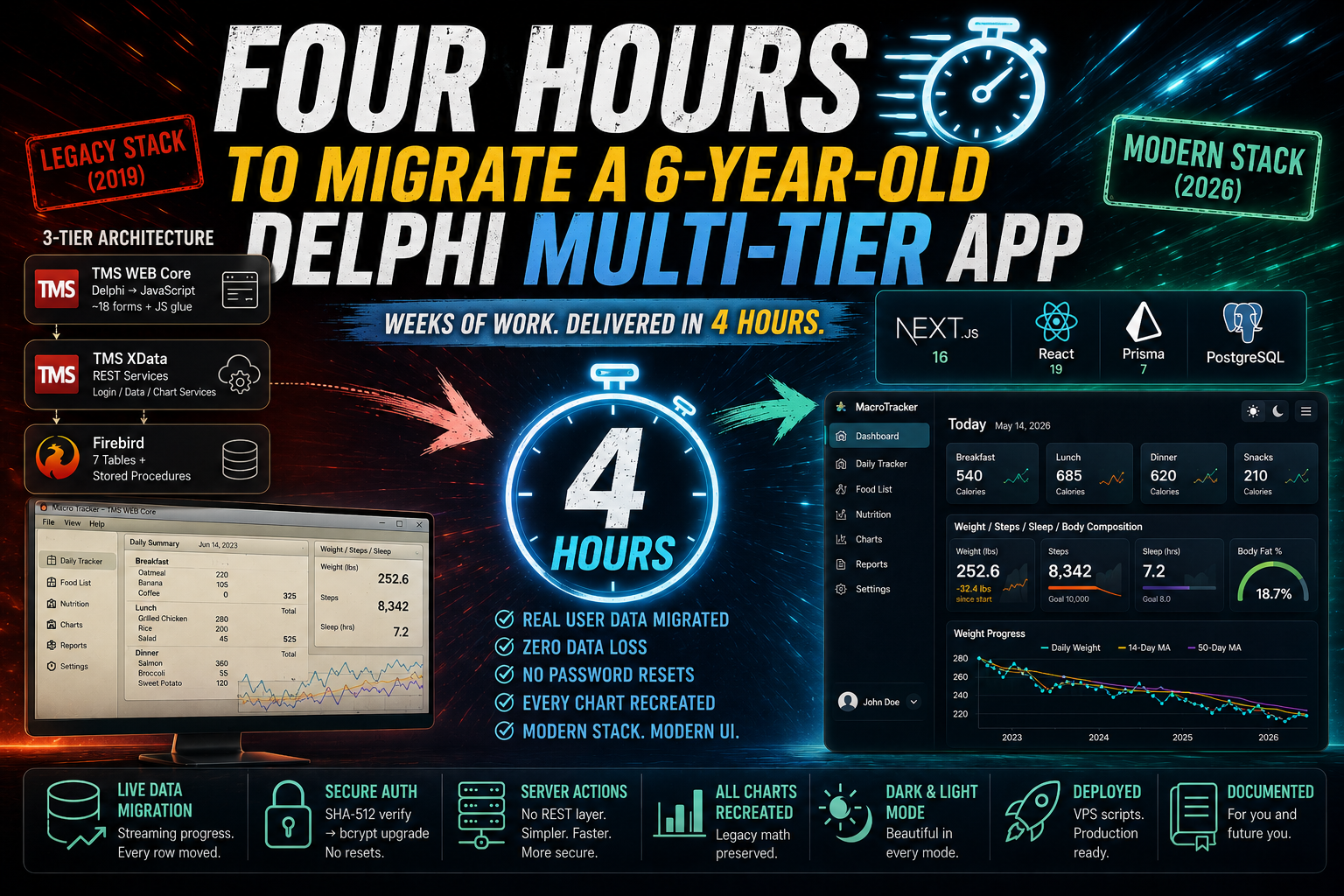
If you only take one thing from this post, take this: the four hours are not the story. The six months before the four hours are the story. The speed at the end is a consequence of a skill I've been deliberately building — the skill of driving AI as a genuine engineering tool rather than a novelty. This post is the detailed account of what that actually looks like when it works.
I'm going to walk through every phase. I'll show you the architecture, the decisions, the diagrams. And — because a character reference that only shows the highlight reel is worthless — I'll show you the several points where the AI got something wrong or ugly, I caught it, and we corrected course. That catch-and-correct loop is the whole job now.
Let's go.
The setup (or: what I'm deliberately being vague about)
Here's the honest framing.
I did not sit down and type "migrate my Delphi app" and walk away. What I actually did before a single line of new code was written is the part I've spent half a year getting good at, and it's the part I'll keep a little close to my chest — because it's the difference between a demo and a delivery.
What I'm comfortable telling you:
- I prepared a clean, empty Next.js project as the target. A blank canvas, configured the way I know produces good results.
- I gave the AI controlled access to the old sources — the Delphi units, the XData service layer, the Firebird schema — as read-only reference material.
- I supplied a carefully tuned set of project instructions, house rules, skills, and AI tooling that I've refined over months. These encode how I want code written: conventions, framework versions, design rules, the works. This is my "magic," and it's doing a lot of quiet work in the background of everything below.
That preparation is the leverage. The model is strong, but a strong model pointed at a vague target produces plausible garbage. A strong model pointed at a sharp target, with sharp constraints, supervised by someone who can read the output produces production code. The gap between those two outcomes is expertise, and it does not come for free.
Everything past this point is the four hours.
The legacy system we were replacing
Let's be fair to the old app: it worked, and it had for years. This is a meal- and body-tracking application — you log what you eat across the day, record your weight, steps, and sleep, and it charts your progress over time. Real people had been using it and feeding it data since 2023.
Architecturally, it was a very typical Delphi-era three-tier setup:
The pieces:
- Front end: TMS WEB Core — Object Pascal compiled to JavaScript — with roughly eighteen forms (login, main menu, daily data grid, per-meal editors, food list, nutrition view, charts) and a healthy amount of hand-written JavaScript glue.
- Backend: A TMS XData server exposing typed REST services — a
LoginService, aDataService, and aChartService— with JWT auth and FireDAC talking to the database. - Database: Firebird, with seven tables and a handful of stored procedures that did per-day aggregation (calories eaten, daily nutrition sums, weight/steps rollups).
Nothing wrong with it. But it's a stack with a shrinking talent pool, a desktop-first deployment story, and a UI that looks its age. The customer wanted it on something a modern web developer can pick up, extend, and deploy anywhere. Fair.
My job: rebuild it, faithfully, on a stack from 2026 — without losing a single row of that three-year data history.
The overall plan
Before touching code, the AI and I agreed on a phased approach. This is the first place where supervision matters: I didn't want a firehose of files, I wanted a plan I could sign off on. We settled on:
- Foundation — Prisma schema, PostgreSQL database, and a real data-migration tool to pull the Firebird history across.
- Authentication — because you can't test anything as a real user until you can log in as one.
- The application — daily tracker, food list, nutrition view.
- The charts — explicitly called out as a first-class feature, because charts were the heart of the old app.
- Deployment & docs — get it onto a VPS with repeatable scripts, and document all of it.
Crucially, at the start of each phase the AI paused and asked me questions — real, decision-shaped questions, not "shall I continue?" filler. Which hashing strategy for legacy passwords? Where should migration state live? How should I handle a data quirk? Those questions are where my experience gets injected into the machine's output. I'll flag them as we go.
Phase 1 — The schema and the great data migration
Reading the old world
The first thing the AI did was read. Not just the Firebird CREATE script, but the XData Pascal service implementations — because the schema alone doesn't tell you the business logic. The stored procedures, the SQL inside the Delphi services, the way "calories for a day" was actually computed — all of that lives in the backend code, and all of it had to be understood before a single Prisma model was written.
Seven tables came across conceptually:
Correction #1: "don't just uppercase the columns"
Here's the first place I stepped in. The legacy schema used Firebird's shouty convention — PERMISSION_STRING, DATE_EATEN, NUM_STEPS, DESCR. The first pass at the Prisma schema was faithfully carrying those names over.
I stopped it: use idiomatic TypeScript names. DESCR → description. LBS → weightLbs. NUM_STEPS → numSteps. The schema should read like modern code, not like a database dump from 2010. The AI regenerated the whole schema with clean camelCase field names and proper relations. Small thing, but it's the difference between a codebase a new developer enjoys and one they tolerate.
The passwords problem (and a decision only a human should make)
Then came a genuinely interesting question. The old XData backend verified passwords with Firebird's built-in hash function:
CRYPT_HASH(password USING SHA512)Could we reproduce that in Node — meaning zero password resets for existing users — or did we have to wipe passwords and force everyone to reset?
The AI didn't guess. It connected to the live Firebird database, pulled a real user's stored password hash, and proved the algorithm by hashing a known test password in Node and matching it byte-for-byte:
import { createHash } from "node:crypto";

// SHA-512, hex, uppercase — exactly what Firebird's CRYPT_HASH emits.
const candidate = createHash("sha512").update(password).digest("hex").toUpperCase();
const matches = candidate === storedHashFromFirebird;
Confirmed: it was a plain, unsalted SHA-512. Fully reproducible.
That turned a scary question into a clean decision, which it then put to me:
I approved it. That's the pattern I want in a migration: nobody gets an email saying "please reset your password because we changed backends." They just log in, and behind the scenes their security quietly gets better. The AI proposed it; my job was to recognize it as the right call and greenlight it.
The migration tool itself
This is the part I'm proudest of, because it's where "AI wrote some code" becomes "AI built a tool."
Rather than a throwaway script, we built a proper migration page — outside of authentication (it has to be; it's what creates the first users) — with:
- A form to enter the source Firebird connection details, with a "Test Connection" button that reports live row counts before you commit.
- A connection history so you don't retype credentials.
- A strict confirmation dialog, because this wipes and reloads the target.
- Server-Sent Events streaming live progress — a bar per table — as thousands of rows move across.
Under the hood there are seven ordered migrators (parents before children, so foreign keys never break), each reporting its own tally:
type MigrationResult = { migrated: number; skipped: number };The whole thing ran against the live database and moved 9 users, 766 food items, 15,630 logged meals, and 3,409 weight entries with zero skips.
Correction #2: the floating-point noise
After migration, I looked at the running app and something bugged me: a quantity that should read 1.1 was displaying as 1.100000023841858. A weight showed 252.60000610351562. Ugly.
I flagged it — "the precision seems off, is it rounding or storage?" — and the AI diagnosed it correctly: the old Firebird columns were 32-bit floats; promoted into PostgreSQL's 64-bit doubles, the single-precision noise becomes visible. It offered three fixes and I chose the cleanest: round the values at migration time, so the stored data itself is tidy and the fix is reproducible on any future re-run.
While we were there, I pointed out a second, subtler issue: the per-meal calorie totals didn't always add up to the sum of the visible line items (rounding the raw sum vs. summing the rounded items — off by one, and it looks wrong even when it's mathematically fine). We fixed the totals to reconcile with what the eye adds up. That's the kind of bug an automated tool sails right past and a human who uses the product catches immediately.
Phase 2 — Authentication
Short phase, important phase. Using iron-session for encrypted cookie sessions, we built the login flow around the SHA-512-verify-then-upgrade-to-bcrypt strategy from Phase 1, a protected-route layout that redirects unauthenticated visitors, and a clean sign-in page.
The verification that mattered here wasn't visual — it was proving the login actually worked against a migrated account. The AI sealed a real session, logged in as a genuine migrated user, confirmed the bcrypt upgrade fired on first login, and confirmed a wrong password was rejected. Then it restored the account to its as-migrated state so nothing was left disturbed.
Phase 3 — Rebuilding the application
This is where the old three-tier architecture got collapsed into something dramatically simpler. No separate REST backend. No API layer to design, version, and secure. Next.js Server Actions let the UI call server-side functions directly, with the database access, ownership checks, and validation all living server-side.
The daily tracker
The centerpiece. A day view with a date navigator, one card per meal (Breakfast, Lunch, Dinner, the snacks), the items logged in each with live calorie math, and a weight/steps/sleep/body-composition panel.
Here I made an explicit design call the AI then executed: modernize the interaction model. The old app was page-per-form — click through to a separate screen to edit a meal, another to edit weight. We replaced all of that with modal dialogs and inline editing from a single day view. Add an item via a searchable, server-backed food picker with a live calorie preview. Edit a quantity in place. Adjust weight without leaving the page. It's the same data, a 2026 feel.
Every mutation carries a server-side ownership guard — a user can only ever touch their own data — replacing the JWT-claim checks the old XData services did.
The food list
Full CRUD over food items with their complete nutrition facts, as a responsive table on desktop and cards on mobile (mobile parity was a hard rule — no hidden functionality on small screens). Searchable, paginated. And a genuinely thoughtful delete guard: you can't delete a food item that's referenced by logged meals — the app tells you it's used in N meals rather than either failing cryptically or orphaning three years of history.
The nutrition view
A per-day macro breakdown — protein, carbs, fiber, net carbs, sugars, added sugars, fat, saturated fat, cholesterol, sodium, water — across a selectable date range, with daily averages, faithfully reproducing the old GET_DAILY_NUTRITION_STATS stored procedure as a clean SQL aggregation.
Throughout this phase, verification was continuous: the AI logged in as a real migrated user and confirmed that a rendered day's total matched the database's own aggregate to the exact calorie:
SELECT SUM(quantity * calories) AS total_calories
FROM item_eaten
JOIN food_item ON food_item.id = item_eaten.food_item_id
WHERE item_eaten.user_id = $1 AND item_eaten.date_eaten = $2;
Phase 4 — The charts
Charts were non-negotiable. In the old app they were the payoff — the visual proof of months of effort. The customer's data tells a genuinely great story (one user's multi-year weight journey), and it had to be told well.
We stayed with Chart.js, deliberately, because it ports cleanly into React and gives real control. The data layer reproduced the legacy logic exactly, including a detail I insisted we honor faithfully: the "14-day" and "50-day" moving averages in the old app were actually computed as row-based windows over consecutive weigh-ins, not calendar days. We matched that, so returning users see the same curves they always saw. Weight chart, calorie chart, and the weight-loss stat cards (starting vs. current, total change, rate per week/month).
Correction #3 and #4: the charts that fought back
The charts did not come out right the first time. This is worth showing, because it's the most honest illustration of the loop.
The fix was to hand the axis real timestamps instead of strings:
// Before: date strings collapse onto a single point with parsing disabled.
const data = rows.map((r) => ({ x: r.dateEaten, y: r.weightLbs }));

// After: numeric epoch-millis are what a time axis actually wants.
const data = rows.map((r) => ({ x: new Date(r.dateEaten).getTime(), y: r.weightLbs }));The root cause was subtle, and a good example of a thing a human notices instantly and a machine doesn't: the app's theme colors are stored as oklch() CSS variables and color-mix() expressions that a <canvas> simply can't resolve. The fix was to detect the active theme properly and hand the chart explicit, legible color palettes per mode — plus render the raw daily series as a translucent point-cloud with the moving averages as clean lines on top, which de-noised the busy calorie chart.
Two iterations, both kicked off by me looking at the actual rendered screen and saying "no." That's the job. The AI is astonishingly fast at producing and fixing; it is not a substitute for someone with taste looking at the result and deciding whether it's good enough. That someone is still, very much, a person.
The bonus round: zero third-party lock-in, dark mode, deployment, docs
A few things happened around and after the core phases that deserve mention, because they're where "it works on my machine" becomes "it's a real product."
- Dark and light mode were introduced cleanly across the whole app with a theme toggle — the sort of thing that touches every component and is miserable to retrofit by hand, done consistently.
- We removed dependence on third-party UI services — the UI is built on components we own and control, not a rented design system. No surprise pricing, no external runtime dependency for the interface.
- We built VPS deployment with proper build and deploy scripts — the app doesn't just run locally, it ships to a real server repeatably.
- And to top it off, documentation — genuinely good documentation, the kind you're grateful for six months later when you've forgotten how the migration tool's connection history works.
Each of these is, on its own, an afternoon of fiddly work in a normal project. Here they were increments.
What actually made this fast
Let me be blunt about where the speed came from, because "AI did it" is the wrong lesson and I don't want anyone to draw it.
The AI wrote the code. But the AI wrote the right code because it was operating inside a system I built. Consider what was actually happening in the background of every single step above:
- It read the real legacy source and the real database before proposing anything. It didn't hallucinate the old business logic — it went and confirmed it. (It literally connected to Firebird and matched a password hash to prove an assumption.)
- It asked me decision-shaped questions at every phase boundary and let my judgment set direction: naming conventions, hashing strategy, where to modernize the UX, how to handle data quirks.
- It verified its own work against ground truth constantly — rendered totals checked against a
SELECT SUM(...), CRUD round-trips proven, logins actually performed — not "looks done to me." - And when it produced something wrong or ugly — the uppercase names, the float noise, the empty charts, the unreadable dark mode — I caught it and corrected it, and it fixed the actual root cause rather than papering over the symptom.
None of that works without an operator who can read Prisma, spot an off-by-one in a calorie total, recognize a floating-point storage artifact on sight, and know that unsalted SHA-512 should be quietly upgraded rather than kept. The AI is a phenomenal force multiplier on expertise. It is not a substitute for it. Point it at a hard problem without that expertise and you get confident, plausible, subtly-wrong output at terrifying speed.
That's the skill I've spent six months building. Not "prompting." Judgment, at the speed of generation.
The summary I actually want you to remember
A real, in-production application — Delphi TMS WEB Core front end, TMS XData REST backend, Firebird database, three years of live user data — was rebuilt on Next.js 16, React 19, Prisma 7, and PostgreSQL. New schema with clean idiomatic naming. A live, streaming data-migration tool that moved every row with zero loss and no password resets. Modern session auth. A server-action backend with no separate REST tier. A daily tracker, food list, and nutrition view, all responsive and dialog-driven. Every chart recreated in Chart.js with the legacy math preserved. Dark and light mode. No third-party UI lock-in. VPS deployment scripts. And solid documentation.
Weeks of work — realistically a month or more done carefully by hand — delivered in about four hours.
But hear the actual lesson, because it's the one that matters for the next few years of this profession: the four hours are only possible because of the six months of learning and collecting experience. The productivity is real and it is staggering, but it is unlocked by an expert who can manage the tooling, assess the generated code with a critical eye, make the judgment calls a machine shouldn't, and prompt in a way that drives straight at the target. Take the expert out of that loop and the speed doesn't produce a migration — it produces a very fast mess.
We are, genuinely, at a new place. For the first time, a developer's experience and taste can be applied at the speed of thought instead of the speed of typing. The bottleneck moved from "how fast can I write it" to "how well can I direct and judge it." That's not a threat to good engineers. That's the best day good engineers have ever had.
I'm more excited about building software than I've been in years. Four hours for a month of work will do that to you.
Let's build.